
Loading...
Managing livestock means dealing with constant movement. Animals don't line up neatly for headcounts, and when processing hundreds through gates or monitoring herds across pastures, getting an accurate count becomes harder than it looks. With AI livestock counting deployment, the challenge isn’t just about numbers on a spreadsheet. Every miscounted animal affects your feed planning, inventory records, and bottom line in ways that compound over time.
Traditional manual counting hits around 95% accuracy on a good day, which seems acceptable until you calculate what that 5% error margin actually costs. For operations handling large volumes daily, those missed counts translate directly into financial losses that add up quickly.
AI livestock counting deployment flips this script entirely, pushing accuracy above 99.5% while slashing the time your team spends on manual tallies. At Folio3 AI, we've worked with farms and processing facilities to implement smart agriculture solutions that transform camera feeds into dependable data you can actually trust.

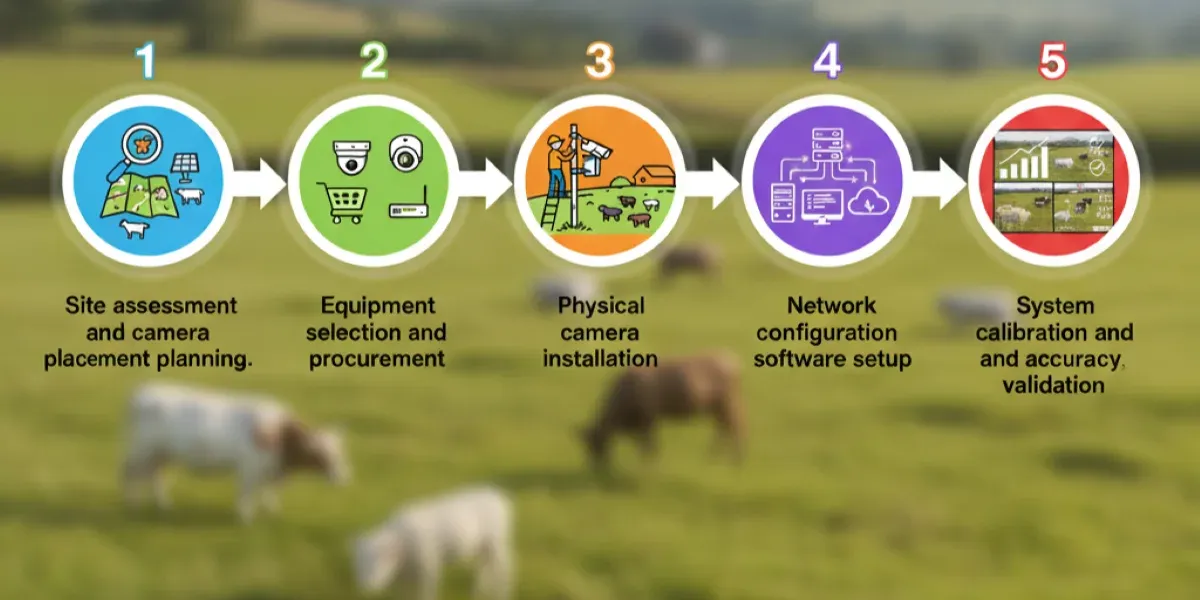
Successful AI livestock counting depends on proper camera deployment. This guide walks you through site assessment, equipment installation, network configuration, software setup, and system validation to ensure accurate, reliable automated counting from day one.
Map your facility to identify optimal camera locations before purchasing equipment. Consider animal traffic patterns, counting zones, lighting conditions, and infrastructure constraints to maximize coverage while minimizing hardware costs and installation complexity.
Survey counting zones and traffic patterns: Walk through gates, chutes, and pens during peak movement hours to document where animals bunch up, bottleneck locations, and typical flow speeds.
Measure mounting locations and angles: Identify sturdy surfaces at 3-5 meter heights that offer 61-90 degree coverage without obstructions, avoiding direct sunlight, glare, or backlit silhouettes.
Test connectivity at camera positions: Verify WiFi signal strength or Ethernet access at each planned location, check power outlet availability, and document cellular coverage for backup.
Calculate camera quantity needed: Allocate one camera per 3-4 meter width for gates; large pens require overlapping coverage to eliminate blind spots and tracking gaps.
Document environmental challenges: Note areas with dust accumulation zones that require frequent cleaning, locations exposed to rain or extreme temperatures, and areas vulnerable to physical impact from equipment.
Choose cameras and networking hardware matching your site requirements and budget. Balance resolution needs against bandwidth constraints while ensuring weatherproofing meets your environment's demands for reliable long-term operation across all seasonal conditions.
Select camera specifications: Specify 1080p minimum for standard gates, 4K for distant mounting, 30-60 fps frame rate, IR night vision, IP66 weatherproofing, and thermal imaging.
Choose networking equipment: Purchase PoE switches providing power and data through single cables, calculate total port count plus 20% expansion capacity for enterprise-grade equipment.
Determine storage requirements: Budget 50-100 GB per camera weekly for continuous recording, consider edge storage devices plus cloud backup for critical footage and compliance.
Select mounting hardware: Order weather-resistant brackets, poles, or wall mounts rated for outdoor use, including cable conduit, junction boxes, and protective housings for connections.
Plan backup power solutions: Install UPS systems protecting against power fluctuations, size batteries providing 2-4 hours runtime for critical counting locations during outages.
Mount cameras securely at planned locations following electrical and safety codes. Run cabling through protected conduit, establish stable power connections, and weatherproof all outdoor connections to prevent equipment failure and ensure consistent operation.
Install mounting brackets and poles: Secure brackets to walls or install freestanding poles with concrete footings, ensuring mounts handle camera weight plus wind load with precise leveling.
Run network and power cables: Route PoE Ethernet through conduit from switches to cameras, maintaining separation from high-voltage lines using outdoor-rated Cat6 cable for long runs.
Mount and aim cameras: Attach cameras with anti-vibration hardware, aim lenses covering designated counting zones without gaps, and adjust angles in 5-degree increments while monitoring live feeds.
Weatherproof all connections: Apply dielectric grease to Ethernet connectors before sealing, install drip loops preventing water ingress, and use IP67-rated junction boxes for outdoor splices.
Verify physical security: Install tamper-resistant hardware preventing unauthorized access, add protective cages in high-traffic areas, clearly label camera locations and circuit breakers for maintenance.
Configure network infrastructure supporting camera bandwidth requirements. Install AI counting software, connect cameras to the platform, define counting zones, and establish user access controls for operational dashboards, ensuring smooth data flow.
Configure network switches and routers: Assign static IP addresses to cameras for consistent connectivity, enable VLAN segmentation isolating camera traffic, and configure QoS prioritizing video streams appropriately.
Install AI counting software: Deploy edge processing units or configure cloud platform access, input license keys, activate counting modules, and set up role-based user accounts.
Connect cameras to the AI platform: Add cameras by IP address or auto-discovery protocol, configure video streams selecting appropriate resolution and frame rate, test connectivity, and verify feeds.
Define counting zones and rules: Draw virtual boundaries around gates and entry points, set directional counting triggers, and configure animal separation parameters preventing double-counting during congestion.
Establish alert thresholds: Program notifications for count discrepancies exceeding 3%, camera offline conditions, or confidence scores below 0.5 with email, SMS, or dashboard delivery.
Run controlled tests comparing AI counts against manual verification. Adjust camera angles, confidence thresholds, and tracking parameters until achieving maximum accuracy across varied conditions before declaring the system fully operational.
Conduct pilot testing period: Monitor 100-300 animals through counting zones over 2-4 weeks, document AI counts alongside manual tallies, and identify systematic errors requiring adjustments.
Test environmental conditions: Verify counting accuracy during daylight, dawn, dusk, and night with IR activation plus performance in rain, fog, dust, snow, and crowded conditions.
Adjust camera angles and settings: Modify camera positions in 5-degree increments, reducing animal overlap, optimize zoom and focus, fine-tune exposure settings, and prevent motion blur.
Tune AI confidence thresholds: Start at a 0.5 confidence threshold and adjust based on false positive rates, balancing lower thresholds capturing more detections against precision requirements.
Document accuracy metrics: Calculate precision, recall, and overall accuracy targeting 98%+ precision, 97%+ recall, and under 2% false positive/negative rates before full deployment.
Selecting the right camera hardware determines your system's accuracy, reliability, and maintenance requirements. The choice between fixed cameras and drones depends on your facility layout, herd movement patterns, and operational priorities.
Modern livestock counting relies on cameras that handle challenging farm environments while delivering clear footage. Your hardware selection directly impacts counting accuracy and system uptime across different weather conditions and lighting scenarios.
Resolution: 1080p minimum for standard gates, 4K for large counting zones or distant mounting
Frame rate: 30 to 60 fps captures fast-moving animals without motion blur
Field of view: 61 to 90 degrees, depending on mounting height and coverage area
Night vision: IR capability enables 24/7 operation without lighting gaps
Weatherproof rating: IP66 or higher protects against dust, rain, and temperature extremes
Thermal option: 640×512 px resolution adds heat stress and fever detection
Mounting height: 3 to 5 meters, optimal for most livestock sizes
Standard IP66-rated 4K camera systems: $450 to $750 per camera (includes NVR recording).
Individual weatherproof cameras with 4G connectivity: $150 to $350.
Entry-level thermal cameras (640×512 resolution): Starting under $1,500.
Professional-grade thermal imaging systems: $3,000 to $8,000.
Aerial counting systems work best for large pasture operations where animals are spread across hundreds of hectares. Drone specifications determine coverage area per flight and image quality for accurate detection.
Flight time: 35 to 45 minutes covers 200 to 500 hectares per battery cycle
Weight: Under 920g ensures portability and easier regulatory compliance
Payload capacity: Must accommodate RGB plus thermal cameras simultaneously
Flight patterns: Grid or lawnmower paths ensure complete coverage without gaps
Ground sampling distance: 2 to 5 cm per pixel delivers individual animal identification detail
Altitude range: 40 to 60 meters balances coverage area with image resolution
Obstacle avoidance: Essential for safe autonomous flights near structures and trees
Standard prosumer drones with 45-minute flight times: $2,000 to $3,000.
DJI Mavic 3 series with advanced imaging (43-minute flight time, suitable for livestock counting): $2,849 to $4,959.
Enterprise-grade drones with integrated thermal imaging: $8,000 to $15,000+.
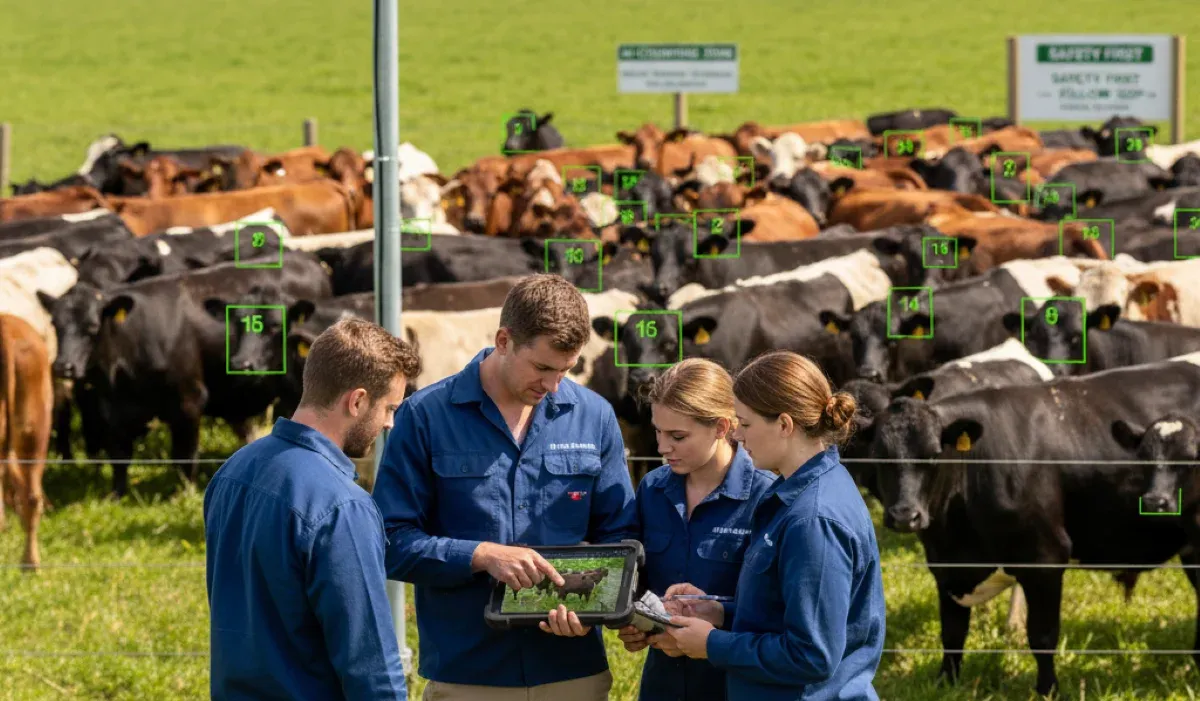
Even the most advanced system requires skilled operators who know when to trust automated counts and when to investigate discrepancies. Structured training not only builds confidence but also establishes clear protocols for consistent daily operation.
To address different responsibilities, training is delivered in tiers. Farm hands attend 2-hour sessions focused on dashboard monitoring and responding to alerts. Managers participate in 4-hour workshops covering report generation and system adjustments. IT staff undergo 8-hour deep dives into system architecture and troubleshooting. Together, these tailored sessions ensure every role is equipped to operate effectively.
Central to operations is the real-time dashboard, which displays population counts by zone with color-coded confidence scores. A green score above 0.8 indicates reliable automated counts, yellow scores between 0.5 and 0.8 suggest review, and red scores below 0.5 trigger manual verification. This tiered system ensures quick interpretation and accurate responses.
When confidence drops, staff follow a clear override protocol. Automated counts are overridden if discrepancies exceed 3%, during extreme weather, or following equipment issues. Each override is documented with timestamped notes to support continuous system improvement. By keeping override rates below 5% weekly, farms maintain a strong quality benchmark.
Reliable performance also depends on a structured maintenance routine. Daily tasks include lens cleaning and visual system checks, while weekly spot checks verify accuracy against manual counts. Monthly camera alignment and quarterly full system calibration further optimize accuracy, ensuring long-term stability.
Finally, common troubleshooting steps enable quick recovery. A camera going offline usually indicates power or network problems. Accuracy drops often trace back to dirty lenses, which can be solved with microfiber cleaning. If counts seem unusually low, operators check whether thresholds are set too high or if counting zones lack adequate lighting. With these basics, staff can resolve most issues before escalation.
Deployment is only the start; ongoing monitoring ensures the system adapts to seasonal changes, animal variations, and operational needs, delivering consistent accuracy and reliability long after installation.
Seasonal changes, new breeds, and evolving farm environments require regular model adjustments. Continuous updates keep detection accurate across conditions, ensuring reliable counts despite winter coats, mud, snow, or changes in background scenery.
Track weekly accuracy, uptime, and alert responses. Monthly reports highlight herd movement, health patterns, and efficiency, while dashboard alerts quickly flag malfunctions, bandwidth issues, or accuracy drops needing immediate investigation.
Remote diagnostics ensure continuous health monitoring, while automatic or on-demand updates improve performance. For critical issues, technical support provides rapid assistance via phone, email, or remote access within four hours.
Manual verification of data enhances accuracy over time. User feedback reduces false positives and negatives, while feature requests guide customized improvements, keeping the system aligned with changing operational priorities and future requirements.
Folio3 AI brings agriculture-specific expertise to every deployment, understanding the unique challenges of livestock operations from personal experience helping farms and processing facilities implement successful AI solutions.
Our solution integrates seamlessly with all camera setups, whether you're using standard security cameras, existing surveillance systems, or specialized equipment. No need for expensive hardware upgrades or specific computer vision cameras, making deployment faster and more cost-effective.
Our computer vision system automatically counts cattle as they move through gates, chutes, and loading zones. It tracks fast-moving animals accurately across varied lighting and weather conditions without wearables or manual oversight.
The solution detects and logs every animal entering or exiting designated areas. This enables hands-free headcounts during transportation, auction check-ins, or pen transfers, reducing errors and speeding livestock movement.
Operators access cloud-based dashboards displaying real-time headcounts, movement events, and alerts. The system flags anomalies like overcounts, undercounts, or irregular patterns so you can address issues immediately.
Every count is automatically timestamped and digitally recorded, creating traceable records of cattle movement for each load, pen, or sale. These records support regulatory compliance, reduce disputes, and streamline audits.
The solution connects with RFID tag systems, auction software, transport tracking platforms, or ERP solutions. Robust API support syncs all data in real time, eliminating manual entry or duplicate record keeping.
Whether managing a small auction site or a multi-gate transport facility, the solution configures to match your layout and traffic volume. It scales to handle hundreds or thousands of animals daily.

Track labor hours eliminated and multiply by your hourly labor cost. Add stray prevention savings by multiplying avoided incidents by the average animal value. Include feed waste reduction and early health intervention savings. Most 500+ head operations see full payback within 9 to 14 months.
Start with 1080p minimum resolution, upgrading to 4K for large counting zones or distant camera placement. A field of view between 61 and 90 degrees works for most installations, with the exact angle depending on mounting height and coverage area needed.
Yes, our system connects via API to major herd management platforms used across the industry. We sync individual IDs, timestamps, counts, health flags, and location data in real time, eliminating duplicate data entry and ensuring seamless workflow integration.
Each camera requires 2 to 8 Mbps, depending on resolution. A 10-camera system needs a minimum of 40 Mbps upload bandwidth, with 60 Mbps recommended. Edge processing reduces bandwidth needs by transmitting only metadata rather than full video streams.
Infrared night vision enables 24/7 operation without lighting changes. Weatherproof IP66-rated cameras handle rain, dust, and temperature extremes. Algorithms adjust for fog, snow, and shadows automatically, maintaining accuracy across changing conditions.
Pilot phase runs 2 to 4 weeks at one location. After validation, full facility deployment takes 2 to 6 weeks, depending on camera count. Training adds 1 week. The total timeline from initial consultation to operational system averages 8 to 12 weeks.
All video streams use TLS 1.3 encryption in transit and AES-256 encryption for stored footage. Face blurring protects worker privacy where required. You control data residency, keeping footage on premises or selecting specific cloud regions.
Daily lens cleaning takes minutes. Weekly accuracy spot checks verify performance. Monthly alignment checks ensure cameras maintain optimal angles. Quarterly model updates adapt to seasonal changes. Remote diagnostics catch most issues before they affect accuracy.
Custom-trained models recognize specific breeds like Holsteins versus Herefords with high accuracy. Age group differentiation based on size works for clear categories like calves versus adults. Custom training improves accuracy for your specific herd composition.