

Loading...

Mobile and web applications have evolved into something extraordinary. What once required massive development teams and months of complex programming can now be accomplished with a few API calls and smart implementation strategies.
Think about the apps you use every day. Spotify creates personalized playlists that feel like they know your music taste better than you do. Google Photos automatically organizes thousands of images by recognizing faces, objects, and locations.
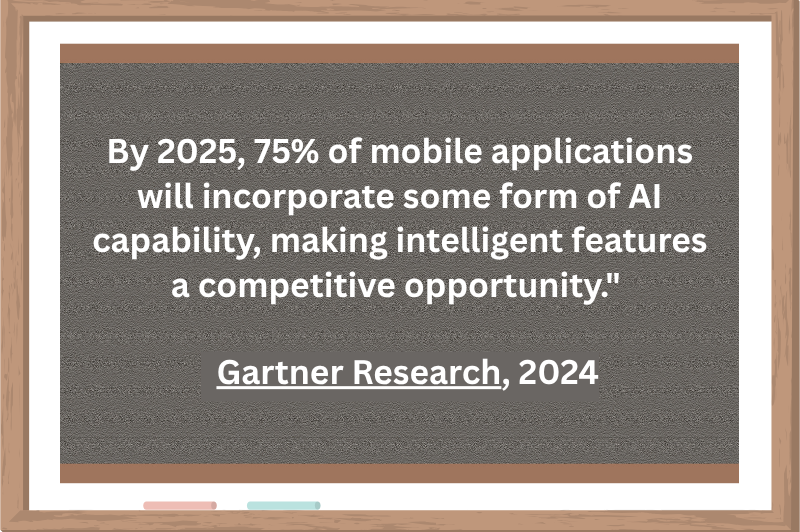
Source: Gartner Research, 2024
This detailed guide provides a practical roadmap for integrating AI into your app, covering everything from initial planning to production deployment.
We’ve guided 100+ companies through successful AI integration, from problem identification to production scaling, avoiding costly mistakes along the way.
Stop chasing AI hype and start with real problems. We’ve seen too many teams waste months building impressive demos that solve nothing. Focus on user pain points first.
Data will make or break your project. 80% of failures happen here. Our CRAFT framework (Complete, Representative, Accurate, Fresh, Trustworthy) has saved clients from expensive rebuilds.
Start smart with APIs, not custom models. Most teams can prove business value in 2-4 weeks for under $1,000/month before committing to six-figure custom development.
Plan for continuous improvement from launch day. AI models decay without monitoring, but our clients see sustained performance through daily tracking and automated drift detection.
Ready to start building? Jump straight to the implementation steps below
AI integration refers to embedding intelligent capabilities into software applications to solve specific problems or enhance user experiences. Rather than building AI systems from scratch, integration focuses on incorporating existing AI technologies, through APIs, SDKs, or pre-trained models, into your application architecture.
Consider it just like adding electricity to your home. You don’t need to build a power plant, you connect to existing electrical infrastructure. Similarly, AI integration connects your app to proven AI services that already understand language, recognize images, or predict user behavior.
Companies have built powerful AI systems that can be accessed through simple code implementations. This approach lets you add features like intelligent chatbots, automatic image tagging, or personalized recommendations in weeks rather than years.
Here are some of the examples that can help you better understand AI integration.
Chatbots and conversational interfaces
Intercom’s Resolution Bot automatically handles 69% of customer conversations, while Zendesk’s Answer Bot resolves 30% of support tickets with human-like understanding. These systems use Natural Language Processing to understand user queries and provide relevant responses.
Recommendation systems
Netflix’s algorithm analyzes viewing patterns to drive 80% of content watched on the platform, while Amazon’s recommendation engine generates 35% of total revenue through intelligent product suggestions. These systems use machine learning to predict user preferences with remarkable accuracy.
Computer vision and image recognition
Pinterest’s visual search lets users find products by photographing items in the real world, while Instagram’s automatic alt-text describes images for visually impaired users. Medical apps like SkinVision analyze photos to detect potential skin conditions with 90% accuracy.
Personalization and predictive analytics
Duolingo adapts lesson difficulty based on individual learning patterns, increasing completion rates by 25%. Waze predicts traffic conditions and suggests optimal routes by analyzing real-time data from millions of users worldwide.
These applications succeed because companies integrate existing AI capabilities strategically rather than attempting to become AI research labs. The result is more intelligent, responsive, and valuable user experiences.
Now let’s find out in detail how to integrate AI into your app.
We have discussed a detailed roadmap for identifying the right AI problem to solve, choosing technologies and implementation strategies, and deploying it in production with real user testing.
Before discussing AI technologies, I want to start with the most important question: What specific problem will AI solve for your users?
Take a close look at where your app struggles today:
Where do people get stuck or need help?
What tasks eat up your team’s time every day?
What do users keep asking for that you can’t deliver?
What smart features do successful competitors offer?
Not every problem needs AI. Ask these four questions before moving forward:
AI should solve real problems, not create fancy features nobody wants. Focus on identifying genuine pain points in your user journey where automation or intelligent assistance would provide clear value. Consider whether users are currently struggling with repetitive, time-consuming, or large information-processing tasks.
Consider your data, team skills, and timeline realistically. Evaluate whether you have sufficient quality data to train effective models and team members with the necessary technical expertise and realistic timeframes for development and testing. Assess your infrastructure capabilities and budget for both initial development and ongoing maintenance.
Calculate potential returns by identifying specific metrics AI could improve. Consider direct revenue increases through better user engagement, cost savings from automated processes, improved customer satisfaction scores, or competitive advantages in your market. Quantify these benefits to justify the investment.
Include ongoing costs, not just initial development. Factor in data storage and processing expenses, model training and retraining, infrastructure scaling, team training, and continuous improvement. AI systems require sustained investment to remain effective as data patterns change and user needs evolve.
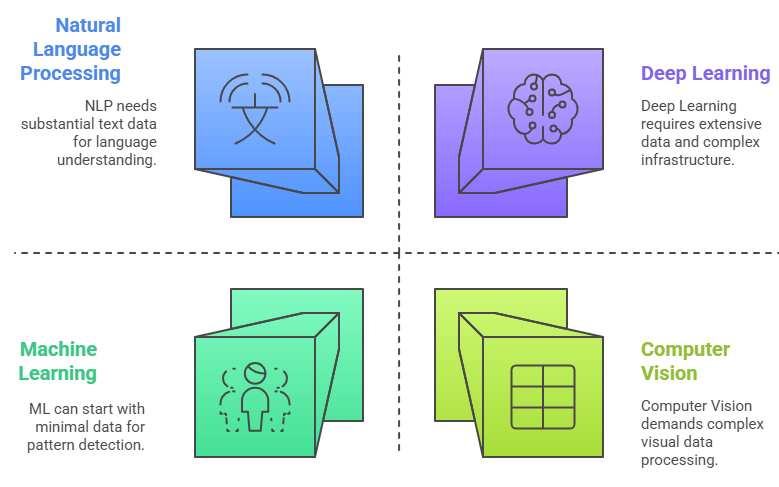
AI technologies are just like different tools in a toolbox. Each one excels at specific tasks, and choosing the wrong one is like trying to hammer a nail with a screwdriver (technically possible), but you’ll waste months in the process.
We’ve seen teams spend six months building complex deep learning systems for problems that could have been solved with simple machine learning in two weeks. Let me save you from that mistake.
Machine learning looks at your historical data and finds patterns that humans might miss. It’s like having a detective who can analyze thousands of cases simultaneously and spot the subtle clues that predict outcomes.
If customers A, B, and C all bought items X and Y, and customer D just bought item X, there’s a high probability that customer D will want item Y. Shopping behavior has predictable patterns based on product relationships, seasonal trends, and customer demographics
Minimum viable dataset: 1,000-10,000 records for simple predictions
Enterprise-grade accuracy: 100,000+ records with consistent formatting
Data types: Structured data works best (spreadsheets, databases, transaction logs)
Historical timeframe: At least 6-12 months of data to capture seasonal patterns
Timeline: 2-4 months for basic implementation, including data preparation and testing
Team requirements: One data analyst and one developer can handle most ML projects
Infrastructure: Modern cloud platforms (AWS, Google Cloud, Azure) provide pre-built ML services
Ongoing maintenance: Monthly model retraining, quarterly performance reviews
Your data changes completely every few weeks (fashion trends, viral content)
You need to understand “why” the AI made each decision (regulated industries often require explainability)
Your problem involves understanding human language nuances or visual creativity
NLP teaches computers to understand, interpret, and generate human language. It’s like giving your application a linguistics PhD who can read, write, and converse in multiple languages simultaneously.
Grammar rules have thousands of exceptions, context matters enormously, and writing style varies by audience and purpose. Multiple AI models work together. One checks grammar, another analyzes tone, a third suggests vocabulary improvements. Real-time analysis requires processing text as users type, understanding context across entire documents, and providing suggestions without interrupting writing flow.
Text volume: 10,000+ examples for basic classification, 100,000+ for advanced understanding
Data quality: Clean, properly formatted text with consistent labeling
Language coverage: Representative samples of all language variations your users employ
Context preservation: Maintain conversation threads and document structure
Underestimating language variety: Users will phrase things in ways you never anticipated
Ignoring context: The same words mean different things in different situations
Over-promising accuracy: Even advanced NLP systems make mistakes that humans wouldn’t
Computer vision teaches machines to “see” and interpret visual information like humans do, but often with superhuman accuracy and speed. It’s like giving your application eyes that never get tired, never blink, and can process thousands of images simultaneously.
Users often can’t describe what they’re looking for in words; they know it when they see it. Using computer vision, multi-layered analysis identifies objects, colors, patterns, styles, and contextual relationships within images. Convolutional Neural Networks extract visual features, similarity algorithms find matching items, and recommendation engines suggest related products
Image quantity: 1,000+ images per category for basic classification, 100,000+ for complex scene understanding
Label quality: Precise annotations, bounding boxes for object detection, pixel-level masks for segmentation
Visual diversity: Different lighting conditions, angles, backgrounds, and image qualities
Real-world representation: Images that match actual usage scenarios, not just clean stock photos
Computing power: GPU processing is required for training custom models, and can use CPU for inference with pre-trained models
Storage requirements: High-resolution images consume significant storage. Plan for 10-100TB for serious computer vision projects
Processing speed: Real-time applications need <100ms response times, batch processing can take hours for large datasets
Deep learning uses neural networks with multiple layers to find incredibly complex patterns in data. It’s like having a brain that can simultaneously consider thousands of factors and their interactions to solve problems that traditional programming can’t handle.
Languages have different grammar structures, cultural contexts, idiomatic expressions, and multiple meanings for the same words. Using Deep Learning, transformer neural networks understand entire sentence context, attention mechanisms focus on relevant word relationships, and multilingual training enables zero-shot translation between language pairs. The same model handles 100+ languages, including rare language pairs that have minimal training data
Unstructured data: Images, audio, video, natural language, sensor data
Complex pattern recognition: Problems where relationships are too complex for traditional algorithms
Large datasets: You have millions of examples and the patterns exist but are subtle
End-to-end learning: You want the AI to learn the entire process rather than hand-coding rules
Minimum viable: 100,000 examples for simple classification
Production quality: 1,000,000+ examples for complex tasks like language understanding
Continuous improvement: Plan for ongoing data collection, even Google and Facebook continuously gather training data
Training costs: $10,000-$100,000+ for cloud GPU time, depending on model complexity
Development team: PhD-level AI expertise typically required, 6-18 month development timelines
Ongoing costs: Model serving, continuous training, infrastructure maintenance
Hyperparameter tuning: Thousands of configuration options affect performance
Training instability: Models can fail to converge or produce inconsistent results
Debugging difficulty: Understanding why deep learning models make specific decisions is extremely challenging
The key is an honest assessment of your requirements, resources, and constraints. Too many teams choose deep learning because it sounds impressive, and then struggle with the complexity they don’t need. Start with the simplest approach that could work, prove the business value, and then upgrade to more sophisticated techniques if needed.
You have three main paths. Choose based on your timeline, budget, and team expertise.
In this option, you can get powerful AI features working in weeks, not months
Popular choices:
OpenAI GPT-4: For chatbots, content generation, and text analysis
Google Vision API: For image recognition and document scanning
AWS Comprehend: For sentiment analysis and text insights
Azure Speech Services: For voice recognition and text-to-speech
This option works well when you want to create unique capabilities that competitors can’t easily copy
When it makes sense:
You have proprietary data that gives you an advantage
Your use case is highly specialized
You need complete control over the AI behavior
With this option, you can get custom AI solutions without building an internal data science team
It’s Complex requirements with tight timelines. At Folio3, we help companies integrate AI solutions across healthcare, finance, and e-commerce, delivering working systems tailored specifically according to your guidelines.
Here’s something most AI guides won’t tell you upfront: data preparation typically takes 80% of your AI project time. We’ve seen brilliant teams with cutting-edge algorithms fail because they underestimated this step. Let’s make sure that doesn’t happen to you.
Before we move into collection strategies, let’s clarify what makes data useful for AI. It’s not just about having lots of information; it’s about having the right information in the right format.
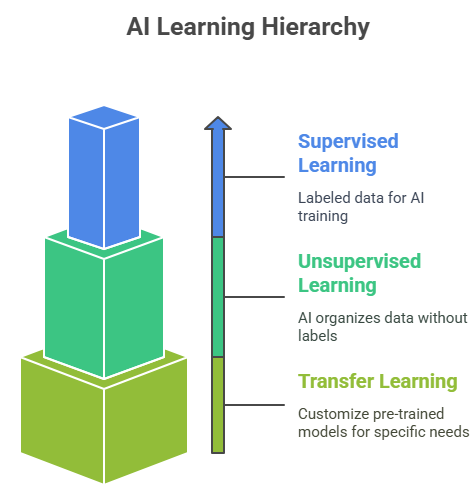
Let’s explore each step by step.
Think of this like teaching a child to recognize animals by showing them pictures with labels. Your AI needs to see thousands of examples where you’ve already provided the “correct answer.”
What you need:
Minimum dataset size: 1,000-10,000 labeled examples for simple tasks
Complex tasks: 100,000+ examples (image recognition, natural language)
Quality over quantity: 1,000 perfectly labeled examples beat 10,000 messy ones
This is like giving your AI a box of mixed-up photos and asking it to organize them into groups without telling it what to look for.
What you need:
Volume matters: Millions of data points work better than thousands
Clean formatting: Inconsistent data formats will confuse pattern detection
Representative sampling: Data should cover all scenarios your AI will encounter
This lets you use AI models that tech giants have already trained on massive datasets, then customize them for your specific needs.
What you need:
Much smaller datasets: Often just 100-1,000 examples
High-quality examples: Since you’re working with less data, each example matters more
Domain-specific data: Your examples should closely match your actual use case
We have learned this framework from a data scientist who spent five years at Google. It’s saved countless projects from expensive mistakes. Data preparation consumes 80% of AI project time. The CRAFT framework ensures your data foundation won’t sabotage months of development work.
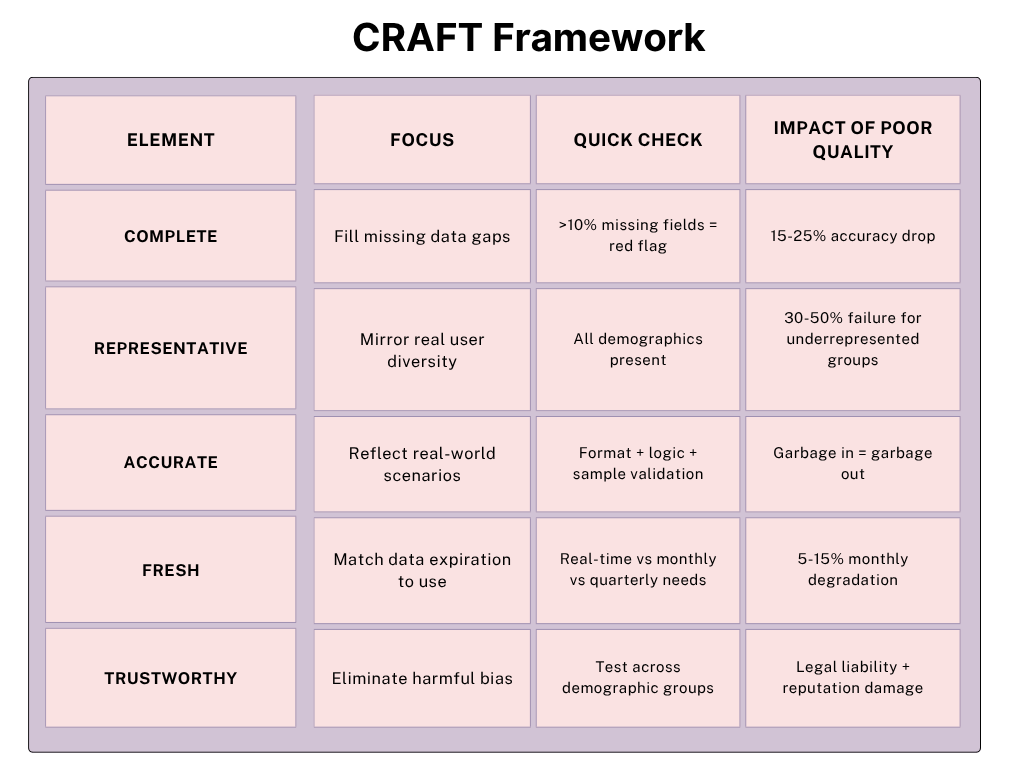
Overview of CRAFT Framework
Complete: Fills missing data gaps that break AI predictions. Prevents model failures when users don’t provide optional information or data collection systems have gaps.
Representative: Ensures AI works for all users, not just dominant groups. Prevents algorithm performance drops for minorities, different regions, or varying usage patterns.
Accurate: Validates data reflects real-world scenarios through format checks, logical consistency rules, and sample verification. Eliminates garbage data that produces unreliable AI outputs.
Fresh: It matches data update frequency to how quickly information becomes outdated, preventing AI from making decisions based on stale user preferences or market conditions.
Trustworthy: Eliminates bias that creates unfair AI decisions. Ensures AI performs equally well across demographic groups and prevents legal liability from discriminatory algorithms.
Poor data quality is the #1 reason AI projects fail in production. Microsoft’s Tay chatbot disaster happened because they didn’t filter training data for bias. Start with data audits before building models. Fix quality issues early as it’s 10x more expensive to correct biased AI after deployment than during development.
Now that we’ve covered the basics, let’s talk about sophisticated data collection approaches that can give you a real competitive edge.
Instead of trying to collect all your data upfront, build systems that naturally gather better data over time.
Implementation approach:
Collect essential user information during onboarding to establish baseline profiles and immediate personalization needs
Track user interaction patterns, feature usage, and struggle points during normal app operation to identify optimization opportunities
Infer user preferences from engagement metrics, time spent, and completion rates rather than relying on explicit surveys
Measure user success rates, learning curves, and achievement patterns over extended periods to understand long-term value delivery
Capture community interactions, sharing behaviors, and competitive dynamics through social features to understand network effects
Sometimes, the data you need doesn’t exist yet. In such a situation, creating high-quality synthetic data can jumpstart your AI development.
When synthetic data makes sense:
Privacy-sensitive applications: Healthcare, finance, personal data
Rare scenarios: Edge cases that happen infrequently but matter
Balanced datasets: Ensuring equal representation across groups
Testing environments: Safe spaces to test AI behavior
Sometimes the best way to get better data is to work with others who have complementary datasets.
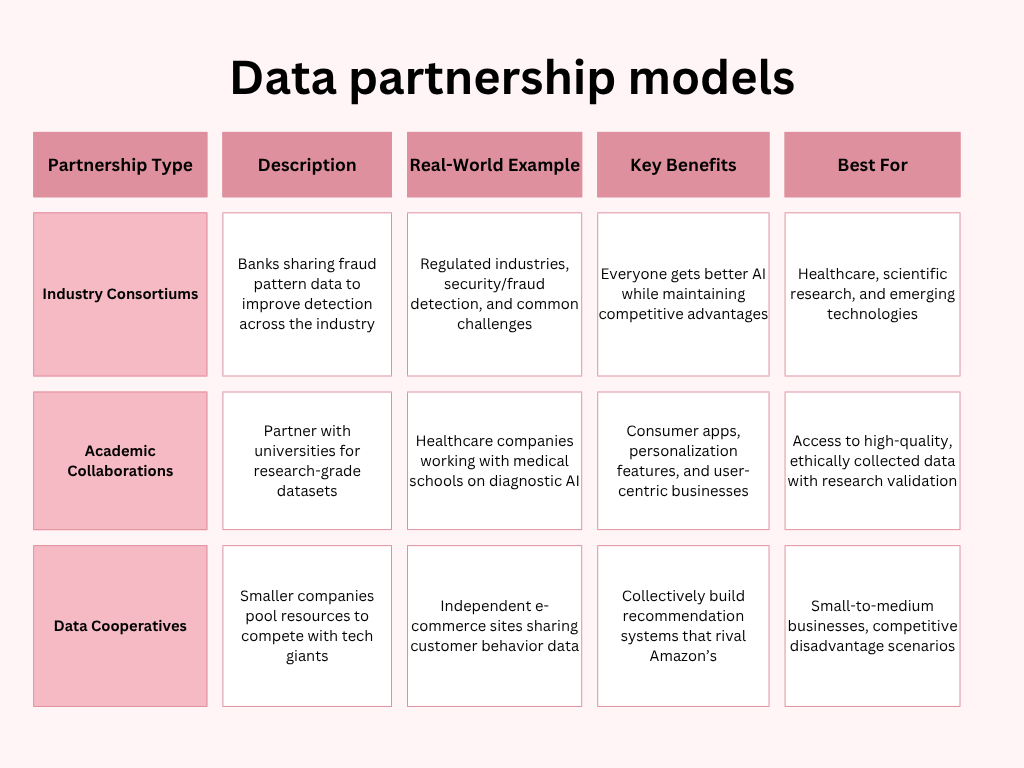
Getting your data labeled correctly is often the difference between AI that works and AI that embarrasses you in production.
Simple annotations:
It’s an annotation that anyone can do with basic training.
Image classification: “Does this photo contain a cat?”
Sentiment analysis: “Is this review positive, negative, or neutral?”
Content categorization: “Which product category does this item belong to?”
Medium complexity annotations:
This type of annotation requires domain knowledge.
Medical image analysis: “Identify potential abnormalities in this X-ray.”
Legal document analysis: “Extract key terms and conditions from this contract.”
Financial analysis: “Categorize this transaction by risk level.”
Expert-level annotations:
Specialists are required to do this type of annotation.
Clinical diagnosis: “What condition does this patient likely have?”
Legal precedent analysis: “How does this case relate to established law?”
Scientific research: “What compounds are present in this chemical analysis?”
Before you feed data into your AI system, you need to be absolutely certain it will work in production scenarios.
Here are a few things you should take care of while finalizing your data.
Compare your training data to real production data
Tools: Simple statistical tests, charts, outlier detection
Red Flag: Training data is very different from real user data
Have business experts review the data
Issue: Patterns that don’t match reality (like winter coat sales in summer)
Make sure AI focuses on relevant features, not irrelevant ones
Red Flag: AI thinks “user ID” or “timestamp” are the most important factors
Your training data looks completely different from production
Business experts say data doesn’t make sense
AI focuses on irrelevant features like timestamps or IDs
As your AI system grows, your data needs will evolve. Building a scalable data infrastructure from the start can save you massive headaches later.
A modern data stack uses cloud-native tools to collect, store, process, and govern data efficiently, laying the foundation for scalable, AI-ready infrastructure from day one.
Event tracking: Capture user interactions in real-time
API integration: Pull data from external sources systematically
IoT sensors: Collect environmental or device data if relevant
User feedback: Built-in mechanisms for users to correct AI mistakes
Store everything in its original format
Clean, structured data ready for AI
Pre-computed features available for multiple AI models
Versioned storage for trained AI models
Extract, Transform, Load processes for data preparation
Process data as it arrives for immediate AI responses
Handle large-scale data transformations efficiently
Automated checks for data consistency and completeness
Who can see and modify what data
GDPR, CCPA, and other regulatory requirements
Complete history of data changes and access
Track where each piece of data came from and how it was transformed
Turning AI plans into real, working solutions requires a practical, user-focused approach. Start simple, build for scale, and test rigorously to ensure your AI performs reliably in the real world.
Design your system to handle increased usage without breaking
Plan for when AI gives unexpected results
Create ways for users to correct AI mistakes
Track accuracy and response times from day one
AI systems handle sensitive information and require robust security measures from day one.
Essential security steps: Here are some crucial security steps you should take to protect your data.
Use HTTPS for API calls and encrypt data storage
Only gather information you actually need for AI functionality
Remove personal identifiers from training and processing data
Ensure data travels safely between your app and AI services
Rotate API keys regularly and never expose them in client-side code
Implement proper login systems before users access AI features
Limit AI feature access based on user roles and needs
Prevent abuse by limiting AI requests per user/session
Clean and validate all data before sending to AI systems
Block malicious prompts and harmful input patterns
Screen for inappropriate or dangerous content requests
Restrict input length and file sizes to prevent system overload
Track all AI interactions for security monitoring and debugging
Follow GDPR, CCPA, and relevant data protection regulations
Audit AI system access and permissions monthly
Prepare procedures for handling security breaches or AI misuse
Unusual API usage patterns that might indicate attacks
AI responses that seem inappropriate or biased
Unexpected data access requests or permission escalations
Performance degradation that could signal security issues
60% of AI security breaches happen due to poor implementation, not sophisticated attacks. Basic security measures prevent most problems.
Now that you have understood how to integrate AI into your app, it’s time to address its challenges. AI integration isn’t just a technical challenge; it’s a business transformation. Many teams face hidden hurdles, rising costs, and unclear ROI. Here’s how to avoid common pitfalls and implement what works.
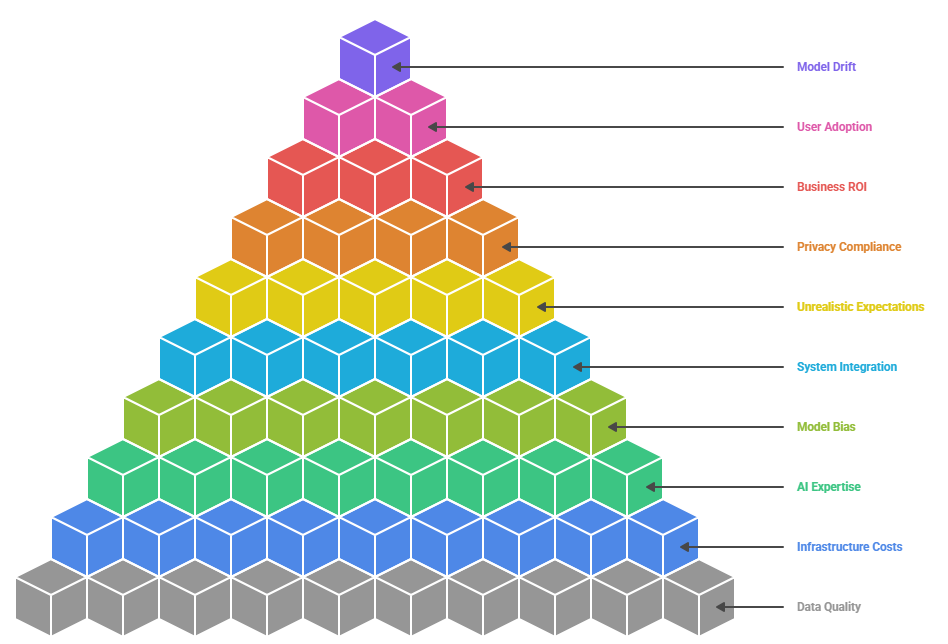
Most AI projects fail not because of bad technology, but because teams underestimate these common challenges. Here’s what actually goes wrong and how to fix it:
Customer records often contain missing fields, inconsistent formats, and test data. AI models trained on messy inputs produce unreliable outputs.
Initial cloud usage starts small but can rapidly scale to unsustainable monthly costs, raising concerns about long-term return on investment.
Many development teams struggle with machine learning concepts. Hiring specialized AI talent is expensive and hard to retain.
AI systems may work well in test environments but fail in production. Biases in training data can lead to unfair or inaccurate outcomes.
New AI tools must often connect with outdated databases and internal systems, which weren’t designed to support modern technologies.
Stakeholders sometimes demand near-perfect accuracy and instant results, without accounting for the time needed to improve AI systems iteratively.
Regulations like GDPR and HIPAA introduce strict requirements. A single misstep can lead to large fines and damaged trust.
Projects often prioritize technical performance metrics rather than focusing on measurable business outcomes like revenue growth or operational savings.
End users may distrust AI or feel threatened by automation, leading to low engagement and underuse of AI features.
AI models degrade over time as data patterns shift. Without ongoing monitoring and updates, performance steadily declines.
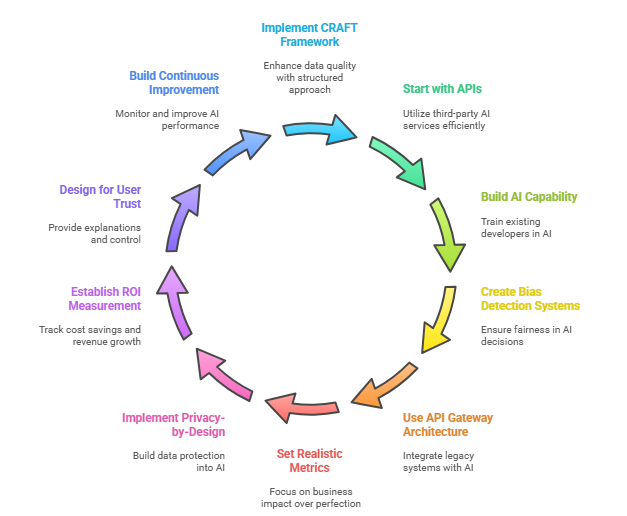
Now that we have understood the problems, let’s find out how you can solve them.
Apply a structured approach to improve data inputs. Fill gaps, validate accuracy with business logic, automate data freshness, ensure diversity in sources, and audit regularly for bias.
Before building custom infrastructure, begin with third-party AI services ($100-$1000/month). Use caching to reduce API calls by 60%, implement serverless computing for variable workloads, and set budget alerts to prevent cost surprises.
Cross-train existing developers with AI fundamentals instead of hiring expensive specialists. Partner with AI consultants who transfer knowledge to your team. Use no-code AI platforms for business analysts to create simple models.
Test AI performance across different demographic groups. Implement confidence scoring that flags uncertain decisions for human review. Build user feedback loops so people can correct AI mistakes and improve the system.
Create a translation layer between legacy systems and modern AI services. Gradually modernize components using microservices. Build new data pipelines alongside existing systems without disrupting operations.
Focus on business impact over technical perfection. Start with 80% accuracy that solves real problems rather than 95%, which takes six months longer. Demonstrate incremental value through quick wins and iterative improvements.
Build data protection into AI systems from the start. Use encryption everywhere, minimize data collection, and provide clear user consent mechanisms. Create audit trails for regulatory compliance and data usage transparency.
Track cost savings (reduced manual work), revenue growth (increased conversions), and efficiency gains (faster processes). Use A/B testing to prove AI impact. Calculate customer lifetime value improvements and operational cost reductions.
Provide explanations for AI decisions (“recommended because you liked similar items”). Allow users to override AI suggestions. Show confidence levels with predictions. Create feedback mechanisms so users feel like partners, not subjects.
Monitor AI performance daily, not monthly. Implement automated data drift detection. Use A/B testing for model improvements. Create version control for AI models with instant rollback capabilities if problems occur.
Our expert AI development team at Folio3 has guided 100+ companies through successful AI integration, avoiding common pitfalls and accelerating time-to-value.
You can check out our use cases here.
Let’s talk numbers. Too many companies are shocked by AI costs because they don’t understand what they are really buying. Here’s the honest breakdown based on actual projects.
What you actually get:
Pre-built API integration (chatbot for FAQ, image recognition for uploads)
Basic user interface that connects to AI services
Simple error handling and response formatting
Basic analytics and usage tracking
What you actually get:
Custom model training for your specific use case
Advanced user interfaces with personalization
Integration with existing business systems
Performance optimization and caching
Security and compliance implementation
What you actually get:
Multiple AI capabilities working together
Enterprise-grade security and compliance frameworks
Custom infrastructure optimized for your use case
Advanced monitoring and automated retraining
Full integration with enterprise systems
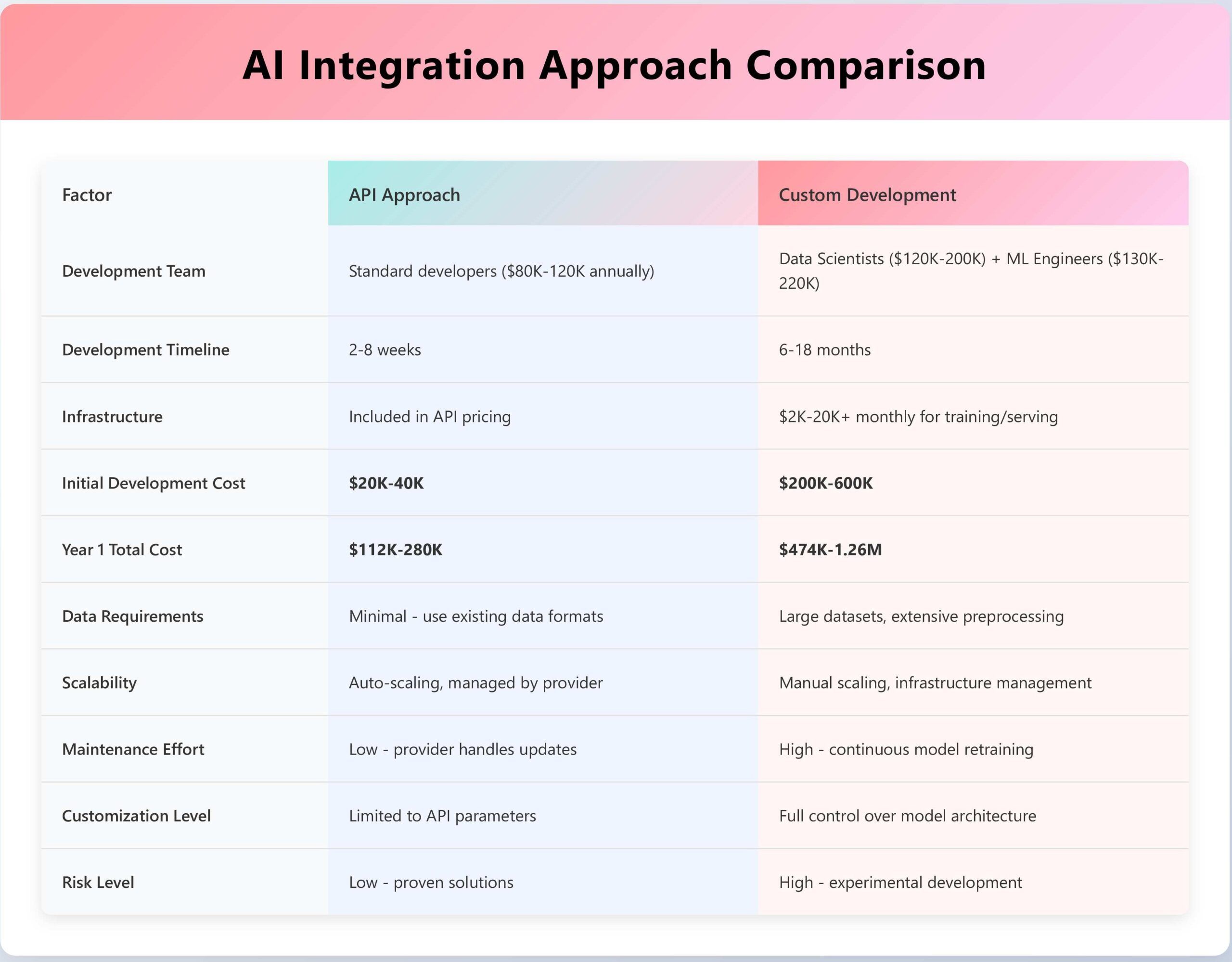
Now let’s talk about the cost of a third-party API and developing it on your own.
After watching hundreds of AI implementations, we’ve learned that technical excellence isn’t enough. The most successful AI projects follow specific patterns that maximize business value while minimizing risk.
Choose a specific use case that directly solves a real user pain point and has measurable business impact. For example, instead of building a comprehensive AI assistant, focus solely on automating your most common customer support questions that currently waste 2 hours of staff time daily. Implement just the basic functionality, handle 5-10 frequent questions with simple, accurate responses rather than trying to solve every possible customer inquiry.
Track three core areas of return on investment: cost savings from reduced manual work (like cutting support ticket response time from 2 hours to 5 minutes), revenue growth through improved user experience (higher conversion rates when customers get instant, accurate answers), and efficiency gains from faster, more accurate processes that free up your team for strategic work.
Your key performance indicators should directly connect AI performance to business outcomes. Monitor user engagement metrics, such as how long people stay on your app after interacting with AI features, operational metrics, such as response accuracy and error rates, and critical business impact measurements, including revenue per user and customer retention rates.
Implement explainable AI features that build user trust by showing confidence scores with each prediction, explaining decision reasoning in plain language, highlighting which data points influenced the decision, and presenting alternative options when appropriate.
Establish ethical AI guidelines through regular bias detection audits that test for discriminatory outcomes across different user demographics. Implement fairness metrics to ensure equal treatment regardless of age, gender, or background. Also, maintain transparency by clearly communicating how AI is used and its limitations, and always provide user control options to opt out or override AI decisions when they disagree with recommendations.
Data privacy protection should be prioritized through data minimization (collecting only essential information), robust encryption for data in transit and at rest, anonymization techniques that remove personally identifiable information, and clear user consent processes for AI feature usage.
Implement comprehensive security best practices, including proper API authentication and rate limiting, input validation to prevent malicious attacks and prompt injection, strict access controls limiting AI system access to authorized users only, and detailed audit logging that tracks all AI interactions for security monitoring.
Adhere to GDPR requirements for explanation rights and data portability, CCPA standards for privacy transparency, HIPAA regulations for healthcare AI applications, and industry standards like SOC 2 and ISO 27001 for enterprise deployments to ensure regulatory compliance.
Establish a continuous improvement process that includes daily performance monitoring of accuracy and user satisfaction metrics, data drift detection systems that identify when model performance degrades due to changing user behavior or market conditions, systematic feedback integration that incorporates user corrections and ratings into model improvements, and scheduled retraining with fresh data to maintain relevance.
Manage updates through rigorous A/B testing that compares new models against existing ones before full deployment, gradual rollout strategies that deploy updates to small user groups first to catch issues early, robust rollback capabilities for quick reversion.
Folio3 accelerates your AI journey with proven expertise, pre-built solutions, and end-to-end support from strategy to scaling across all industries.
We’ve successfully delivered 100+ AI projects across healthcare, finance, retail, and SaaS industries, serving 50+ clients from startups to Fortune 500 companies. Our 5+ years of deep expertise in machine learning and AI integration ensures you avoid common pitfalls and accelerate time-to-market with battle-tested solutions.
We deliver custom ChatGPT integrations for customer support, content generation systems for marketing and documentation, and code assistance tools for development teams.
Computer Vision Solutions: Our computer vision expertise spans medical imaging analysis for healthcare applications, quality control systems for manufacturing, and facial recognition with biometric authentication.
Natural Language Processing: We build sentiment analysis systems for social media monitoring, document processing and information extraction tools, and multi-language chatbots with virtual assistants.
Machine Learning Platforms: Our ML expertise includes recommendation engines for e-commerce that drive 35%+ revenue increases, predictive analytics for business intelligence, and fraud detection systems for financial services.
Our rapid prototyping approach delivers MVP solutions in 2-4 weeks using industry-specific pre-trained models ready for customization. We also build cloud-native architectures on AWS, Azure, and Google Cloud with security-first design and built-in compliance for GDPR, HIPAA, and SOC 2 requirements.
We provide complete AI journey support, starting with strategy and planning, through AI readiness assessment and roadmap development, followed by design and development, including user experience design and technical implementation.
A: Simple AI integrations (chatbots, basic recommendations) typically take 2-4 weeks. More complex implementations with custom models and enterprise integration take 3-6 months. We provide detailed timelines during our initial assessment.
A: AI APIs offer faster implementation and lower upfront costs ($100-$1000/month) but have ongoing usage fees. Custom models require higher initial investment ($50K-$500K) but provide unique competitive advantages and lower long-term costs for high-volume applications.
A: We implement continuous monitoring systems that track performance metrics daily, detect data drift automatically, and trigger retraining when needed. Our A/B testing frameworks ensure model updates improve performance before full deployment.
A: Yes, we specialize in healthcare (HIPAA), financial services (SOX/PCI), and other regulated industries. Our team understands industry-specific requirements and builds compliance frameworks into AI systems from the ground up.
A: We build multiple safety nets including confidence scoring, human-in-the-loop review for uncertain decisions, instant rollback capabilities, and 24/7 monitoring with immediate alerts. Our incident response procedures ensure rapid problem resolution.
A: Absolutely. We offer comprehensive training programs covering AI system management, performance optimization, and basic troubleshooting. Our knowledge transfer approach ensures your team can independently maintain and improve AI systems.
A: We implement privacy-by-design principles with end-to-end encryption, data minimization, user consent management, and comprehensive audit logging. All solutions comply with GDPR, CCPA, and industry-specific privacy requirements.
AI integration has moved from competitive advantage to business necessity. Companies implementing AI features report considerable improvements in user engagement and substantial reductions in operational costs. The key to success lies in strategic implementation: start with clear business objectives, choose the right technology approach, and focus on user value over technical complexity.
Ready to transform your application with AI? The opportunity is now, and the tools are available. Take the first step toward building smarter, more engaging applications that truly understand and help your users.