
Loading...
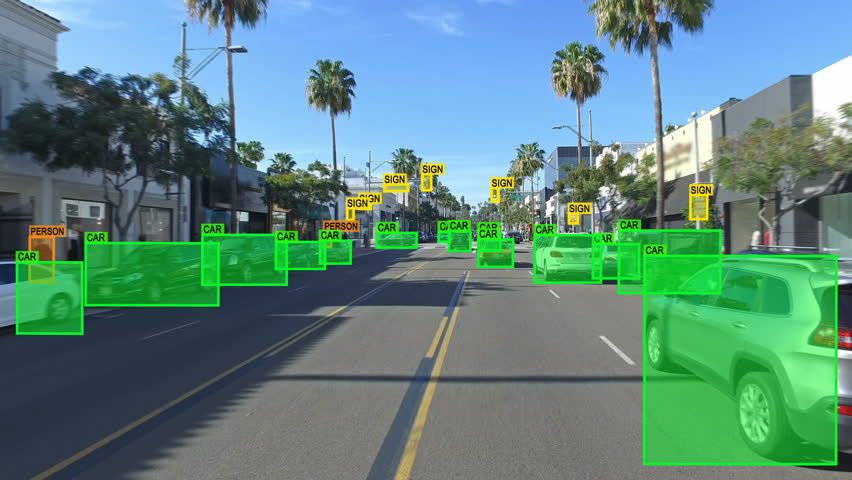
Image annotation and labeling, particularly bounding box annotation, play a pivotal role in computer vision and machine learning applications across various industries. This blog delves into the significance of bounding box annotation, offering insightful tips, real-world case studies, and best practices. Explore how tech experts and businesses can harness the power of precise image annotation to drive innovation, improve automation, and enhance visual recognition systems.

Bounding box annotation involves drawing precise rectangles (or bounding boxes) around objects of interest within an image. Each bounding box is associated with a label that identifies the object contained within it. Here's how bounding box annotation is used in different industries:
In the development of self-driving cars, accurate object detection is critical. Bounding box annotation is used to label vehicles, pedestrians, traffic signs, and other objects in images or video frames. This enables the vehicle's AI system to identify and respond to its surroundings. Code Example - Bounding Box Annotation in Python:
import matplotlib.pyplot as plt import matplotlib.patches as patches # Sample code for drawing bounding boxes fig, ax = plt.subplots(1) ax.imshow(image) # Load your image here rect = patches.Rectangle((x, y), width, height, linewidth=1, edgecolor='r', facecolor='none') ax.add_patch(rect)
E-commerce platforms use bounding box annotation to label and locate products within images. This helps in inventory management, search, and recommendation systems. Precise annotations ensure accurate product identification.
In medical image analysis, bounding box annotation is used to identify and locate abnormalities, organs, or specific structures within X-rays, MRIs, and CT scans. This assists radiologists and AI systems in diagnosis.
In precision agriculture, bounding box annotation is employed to identify and map crops, pests, and anomalies in satellite or drone images. This aids in crop monitoring and management.
Case Study 1: Scale AI Scale AI is a prominent player in the annotation industry, providing image annotation services to various sectors. Their work with autonomous vehicle companies, such as Waymo, demonstrates the importance of precise bounding box annotation in training AI systems for safe self-driving. Case Study 2: Amazon Amazon uses bounding box annotation extensively for product cataloging and quality control. Accurate annotations of product images enable efficient search and recommendation systems, contributing to the success of the e-commerce giant.
Ensure Consistency:
Maintaining consistency in bounding box is crucial for the quality of your dataset. Inconsistent annotations can lead to errors in training and testing your machine-learning models. Here's how to achieve consistency: Standardize Annotation Style: Clearly define the style for drawing bounding boxes, including box size, shape, and color. Annotation Guidelines: Develop comprehensive annotation guidelines that cover various scenarios, such as partially visible objects or objects close to each other. Code Example - Consistent Annotation Style:
# Example guideline for annotation style annotation_style = { "box_color": "red", "box_thickness": 2, "label_position": "top_left" }
Use Quality Control:
Quality control is essential to identify and rectify annotation errors or inconsistencies. Implement a process for reviewing and validating annotations to ensure data quality: Review by Experts: Have experienced annotators or experts review a subset of the annotations to catch any errors or discrepancies. Validation Metrics: Calculate validation metrics such as Intersection over Union (IoU) to measure the accuracy of annotations. Feedback Loop: Establish a feedback loop with annotators to address questions and provide clarifications. Code Example - Validation Metrics with Python:
# Example IoU calculation function def calculate_iou(box1, box2): # Calculate IoU between two bounding boxes x1, y1, w1, h1 = box1 x2, y2, w2, h2 = box2 # Calculate intersection area x_intersection = max(0, min(x1 + w1, x2 + w2) - max(x1, x2)) y_intersection = max(0, min(y1 + h1, y2 + h2) - max(y1, y2)) intersection_area = x_intersection * y_intersection # Calculate union area union_area = (w1 * h1) + (w2 * h2) - intersection_area # Calculate IoU iou = intersection_area / union_area return iou
Scalability:
Choose annotation tools and platforms that can scale with your project's needs. When dealing with large datasets or ongoing annotation tasks, scalability is crucial for efficiency and cost-effectiveness. Automation: Consider tools that offer automation features like pre-defined templates or AI-assisted annotation to speed up the process. Cloud-Based Solutions: Cloud-based annotation platforms can provide scalability by allowing multiple annotators to work simultaneously.
Label Ambiguities:
Clearly define guidelines for annotators to handle ambiguous cases and edge scenarios. Labeling ambiguities can arise in various situations, such as partially occluded objects or objects with unclear boundaries. Guidelines Documentation: Document detailed guidelines and examples for annotators to reference when they encounter ambiguous cases. Annotator Training: Provide training to annotators to help them make consistent decisions in ambiguous situations. Code Example - Handling Ambiguities:
# Example guideline for handling partially occluded objects occlusion_guideline = { "label": "car", "occlusion_threshold": 0.5 # If an object is more than 50% occluded, don't annotate it. }
By following these best practices, you can ensure that your bounding box process is efficient, and consistent, and produces high-quality annotated datasets. This, in turn, will improve the accuracy and reliability of your computer vision and machine learning models, leading to better performance and results in your applications.