
Loading...

You're staring at API documentation that might as well be written in another language. You know your application needs conversational AI, but between authentication, tokens, rate limits, and model selection, the path forward feels unclear. You're not alone in this. According to OpenAI's2024 developer report, the ChatGPT API integration guide has become the most searched technical resource, with over 2 million active applications now using the API globally.
The gap between understanding what ChatGPT can do and actually implementing it stops most developers. This guide removes that barrier. You'll get step-by-step instructions for Python, JavaScript, Swift, and Kotlin, with real code examples, security best practices, and cost optimization strategies that work in production environments.
The ChatGPT API is OpenAI's developer interface that lets you integrate conversational AI capabilities directly into your applications through HTTP requests. Instead of building language models from scratch or relying on the ChatGPT web interface, you send text prompts to
OpenAI's servers and receive intelligent, context-aware responses in JSON format. The API supports multiple models (GPT-4o, GPT-4.1, GPT-5.1), handles multi-turn conversations, processes images alongside text, and enables function calling for dynamic interactions with your application's data and services.
The API operates on a request-response model where your application sends structured messages to OpenAI endpoints and receives generated text based on the model you select and parameters you configure.
You send POST requests to https://api.openai.com/v1/chat/completions with JSON payloads containing authentication, model selection, and message arrays. Each request is stateless; you include conversation history for context.
OpenAI offers multiple models: GPT-4o-mini for speed and cost, GPT-4.1 for balanced production use, and GPT-5.1 for complex reasoning. Each has different pricing, context windows, and capabilities suited for specific use cases.
Tokens are text chunks (roughly four characters each) that model processes. Every model has a maximum context window; GPT-4.1 supports 128K tokens. Your input prompt plus output response must fit within this limit.
OpenAI enforces limits on requests per minute and tokens per minute based on your account tier. Free accounts have stricter limits. Exceeding these returns 429 errors. Upgrade tiers for higher throughput capacity.
Every request requires your API key in the Authorization header as a Bearer token. OpenAI encrypts data in transit using TLS. Enable zero-retention mode to prevent storage of your API requests on OpenAI's servers.

Mastering core concepts like message roles, tokens, and parameters ensures your API calls produce high-quality responses while managing costs effectively.
The system role sets AI behavior ("You are a helpful assistant"). The user represents human input. The assistant contains previous AI responses. Proper role structuring maintains conversation consistency and enables contextual responses.
Tokens split text into processable units. "Hello world" equals approximately 2 tokens. Use OpenAI's tokenizer tool to estimate usage. Both your prompt (input) and the response (output) consume tokens from your quota.
The temperature (0.0-2.0) controls randomness. Lower values produce consistent outputs, and higher values increase creativity. max_tokens caps response length. top_p controls diversity by sampling from the top probability mass. Adjust based on your use case.
ChatGPT doesn't remember past calls. Send full conversation history with each request. As conversations grow, they consume more tokens. Manage this through summarization, truncation, or sliding window approaches to stay within limits.
Responses default to plain text. Enable response_format: { "type": "json_object" } for structured JSON outputs. Request specific formatting like markdown, bullet points, or code blocks through prompt instructions for predictable parsing.
Read more about Key comparison between GPT-4 and GPT-5
Setting up your development environment correctly prevents authentication failures and security vulnerabilities before you write any integration code.
Visit platform.openai.com and register with your email. Verify through the confirmation link. Add payment information to access the API. OpenAI provides initial free credits for testing and development.
Navigate to API Keys in your dashboard. Click "Create new secret key" and copy it immediately. Store in a password manager or secret vault. Never commit to version control.
Choose your programming language (Python, JavaScript, Swift, Kotlin) and install it. Ensure you have the appropriate package manager: pip, npm, CocoaPods, or Gradle. Create a project directory and initialize version control with .gitignore configured.
For Python: pip install openai python-dotenv. For Node.js: npm install openai dotenv. For mobile apps, use native HTTP clients or install SDKs. Add testing libraries to validate integrations before production deployment.
The ChatGPT API follows REST principles using POST methods with JSON payloads. Responses return JSON with standard HTTP status codes (200 OK, 401 Unauthorized, 429 Rate Limit). Basic HTTP knowledge is sufficient, with no specialized expertise required.
Model selection directly impacts performance, accuracy, and costs. Understanding each model's strengths helps you optimize for your specific requirements without overpaying.
Priced at $0.15 per million input tokens, GPT-4o-mini delivers fast responses ideal for high-volume chatbots, simple content generation, or classification tasks. Use when speed and cost efficiency matter more than nuanced reasoning capabilities.
At $2.50 per million input tokens, GPT-4.1 offers strong reasoning, handles complex instructions, and maintains context well. Perfect for production applications requiring reliable, consistent outputs, like document analysis, code generation, or conversational interfaces.
The most capable model at $10 per million input tokens, GPT-5.1 excels at deep reasoning, multi-step problem solving, and sophisticated analysis. Deploy for legal review, advanced coding, or research synthesis where output quality is critical.
Python's simplicity and OpenAI's official library make it the most accessible option for API integration, getting you from setup to working code quickly.
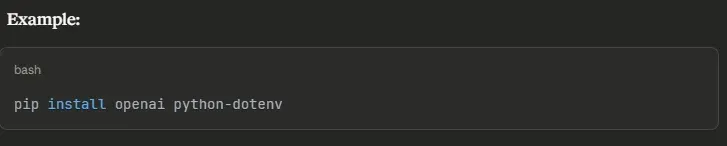
Run pip install openai python-dotenv in your terminal. This installs the official SDK and environment variable management. Use a virtual environment (python -m venv venv) to isolate dependencies from other projects.
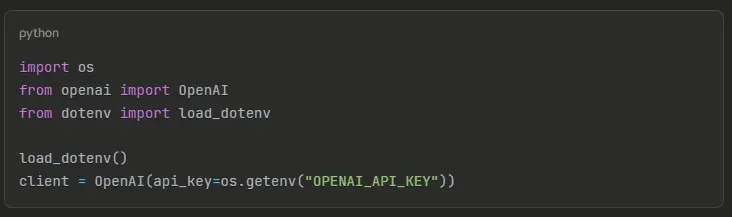
Store your API key in a .env file: OPENAI_API_KEY=sk-proj-xxx. Load using python-dotenv. Never hardcode keys in source files. The OpenAI library reads environment variables automatically when properly configured.
Create a completion request with the model name and the messages array. Include a system message for behavior and a user message for input. The client handles authentication headers and request formatting automatically for you.
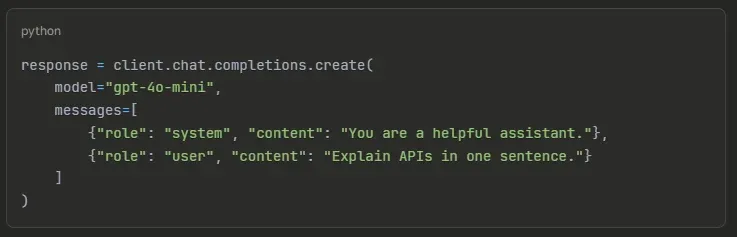
Access the response text through response.choices[0].message.content. Extract token usage response.usage.total_tokens for cost tracking. Check finish_reason to verify completion status; stop means success, length indicates the token limit reached.
Wrap API calls in try-except blocks. Handle RateLimitError with exponential backoff. Wait 2^attempt seconds before retrying. Catch APIConnectionError for network issues. Log errors for debugging. Implement maximum retry limits to prevent infinite loops.
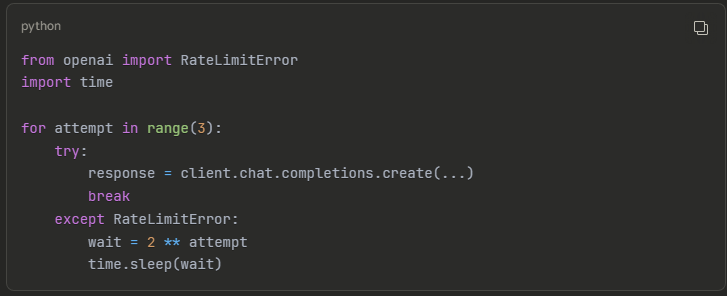
JavaScript developers can integrate ChatGPT using OpenAI's SDK or native fetch, with async/await providing clean asynchronous handling for API calls.
Run npm install openai dotenv to add the official SDK to your project. The package includes TypeScript types for a better development experience with autocomplete and type checking in supported IDEs.
Example:

Create .env in your project root with OPENAI_API_KEY=sk-proj-xxx. Add to .gitignore it immediately. Use require('dotenv').config() to load variables. In production, use platform-specific environment variable systems like Heroku Config Vars.
Initialize the OpenAI client with your API key. Use async/await for cleaner asynchronous code. Pass model name and the messages array to chat.completions.create(). The SDK returns a promise that resolves to the response.
Example:
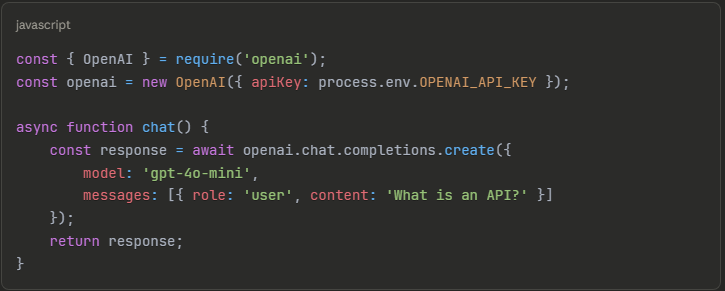
The SDK automatically parses JSON responses into JavaScript objects. Access content using response.choices[0].message.content. Extract token usage from response.usage.total_tokens. The structure matches Python's format for consistency across languages.
Always use async/await instead of raw promises for readability. Wrap calls in try-catch blocks for error handling. Check error status codes to determine failure types, like 429 for rate limits, 401 for authentication issues.
iOS applications call the ChatGPT API using Swift's native URLSession framework, avoiding third-party dependencies while maintaining full control over networking behavior.
URLSession handles all HTTP networking in iOS. Create a session configuration, build a URLRequest with headers and body, then execute asynchronously. URLSession manages connection pooling, timeouts, and response handling automatically for reliable performance.
Build URLRequest with OpenAI's endpoint URL. Set HTTP method to POST. Add Authorization header: Bearer YOUR_API_KEY. Set Content-Type to application/json. Serialize your message dictionary to JSON and attach it as httpBody.
Example:
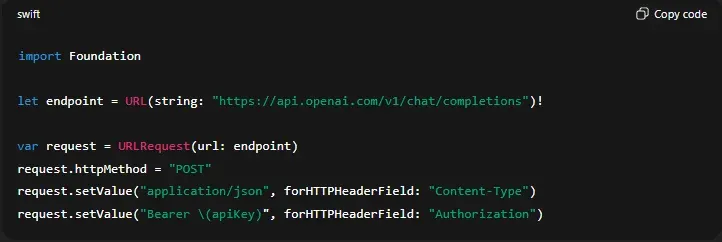
Use Swift's Codable protocol to parse JSON into type-safe structs. Define models matching OpenAI's response structure. JSONDecoder converts data automatically. This prevents runtime errors from manual parsing and provides compile-time type checking.
Check for errors in URLSession's completion handler. Validate HTTP status codes; 200 indicates success. Parse error responses when the status isn't 200. Present user-friendly messages for different failure types: network unavailable, rate limits, or server errors.
Never hardcode API keys in Swift files. They're extractable from compiled binaries. Implement a backend proxy where your server holds keys and forwards requests. Alternatively, store in Keychain with encryption. Use certificate pinning for production apps.
Android developers integrate ChatGPT using Kotlin with Retrofit or OkHttp for networking, leveraging coroutines for clean asynchronous operations.
Add dependencies to build.gradle: implementation 'com.squareup.retrofit2:retrofit:2.9.0' and implementation 'com.squareup.retrofit2:converter-gson:2.9.0'. Retrofit handles request building, JSON conversion, and response parsing while OkHttp manages the underlying HTTP client with pooling.
Define data classes for requests and responses. Create a Retrofit interface with endpoint annotations. Use @POST, @Header for authentication, and @Body for the request payload. Retrofit generates implementation automatically from your interface.
Example:
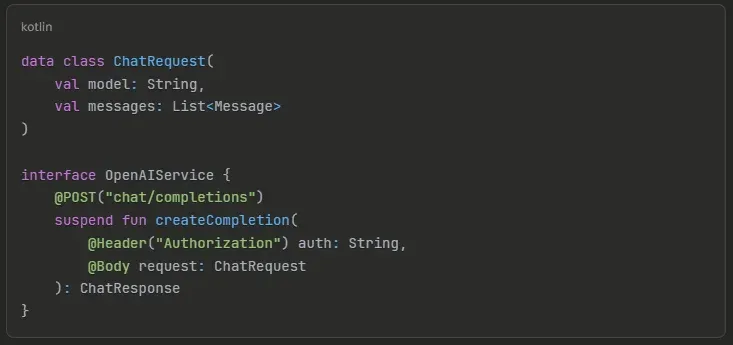
Kotlin coroutines make asynchronous code appear synchronous while remaining non-blocking. Launch API calls in ViewModel scope. Mark functions with the suspend keyword. Handle errors with try-catch inside coroutines for clean error management.
Retrofit with Gson automatically converts JSON to Kotlin data classes. Access response content through your defined models. Update UI from the main thread using withContext(Dispatchers.Main). Display in RecyclerView for chat interfaces or TextView for simple outputs.
Store keys in local.properties, excluded from version control, or use BuildConfig fields. For production, implement a backend proxy architecture, where your server holds keys while the app calls your authenticated endpoint. Use ProGuard/R8 to obfuscate code.
API responses contain more than generated text. Understanding the complete structure helps you extract metadata, track costs, and handle edge cases properly.
The response includes a unique ID, timestamp, model identifier, choices array (usually one element), and usage statistics. Each choice contains the assistant's message and finish_reason indicating completion status. All fields provide valuable debugging information.
Navigate to response.choices[0].message.content for actual text. The choices array supports multiple completions when n > 1, but most applications use single responses. Always validate that choices exist and have elements before accessing.
The usage object tracks prompt_tokens (input), completion_tokens (output), and total_tokens (sum). Monitor this for accurate cost tracking. Multiply tokens by model pricing to calculate per-request costs. Log usage for analytics and budget management.
finish_reason values indicate why the generation stopped. stop means natural completion. length means response hit max_tokens, increase limit if needed. content_filter means moderation blocked output. function_call indicates the model wants function execution.
Validate choices[0] exists before accessing content. Check if the content is null or empty. Some prompts trigger moderation filters returning empty responses. Implement fallback messages like "I couldn't generate a response. Please rephrase."
ChatGPT doesn't remember previous interactions. You manage context by including message history with each request, enabling natural multi-turn conversations.
Create an array with system, user, and assistant messages. Append each user input and AI response. Send the entire conversation with every new request. The model uses this history to maintain context and provide relevant responses.
Example:
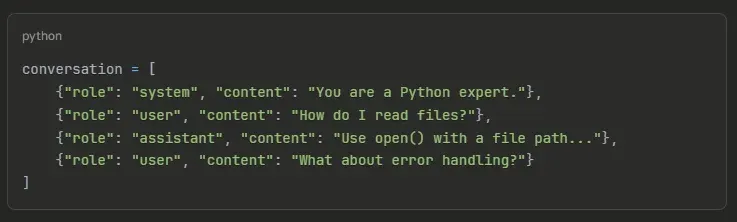
Store conversation arrays in application state; session storage for web apps, variables for scripts, and databases for persistent chats. After each API call, append the new assistant response before the next user input to simulate a continuous conversation.
Conversations grow with each turn, consuming more tokens. Monitor total tokens per request. When approaching limits (128K for GPT-4.1), implement strategies: summarize older messages, truncate non-critical exchanges, or use sliding windows, keeping only recent messages.
For web apps, use localStorage or sessionStorage. For chat applications, save to databases with user IDs. For mobile apps, use local storage or cloud sync. Implement conversation limits, automatically archive or delete old conversations to manage storage costs.
Provide "New Conversation" buttons that clear the message array, keeping only system messages. This prevents context pollution when switching topics. Reset automatically after timeout periods or when users navigate away for a better user experience.
Streaming delivers tokens as they're generated instead of waiting for complete responses, dramatically improving perceived performance in chat interfaces.
Streaming sends response chunks via server-sent events as the model generates text. Use for user-facing chat interfaces, long responses, or scenarios where immediate feedback matters. Skip for backend processing or when you need the complete text before action.
Set stream=True in your request parameters. The API returns an iterable stream object instead of a complete response. Iterate through chunks to access tokens as they arrive in real-time for display.
Example:
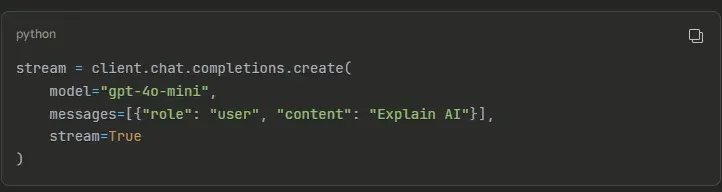
Iterate through the stream using a for loop. Each chunk contains a delta object with incremental content. Check if content exists before processing. Early chunks might be empty. Concatenate chunks to build the complete response for storage.
Create a tool where marketers input parameters (topic, tone, length) and receive generated content, like blog posts, social media captions, and email copy. Use structured prompts with templates. Implement approval workflows before publishing to maintain quality control.
Accept code snippets and error messages, return debugging advice. Structure prompts requesting specific formats: explanations, corrected code, and recommendations. Use GPT-4.1 or higher for accurate code analysis. Implement syntax highlighting in responses for better readability.
Accept document uploads, extract text, send to ChatGPT with instructions: "Summarize in 3 bullet points, highlighting key decisions." Use GPT-4.1 for longer documents. Chunk very large documents, process separately, then synthesize summaries for comprehensive analysis.
Integrate Whisper API (speech-to-text) with ChatGPT for voice interactions. Flow: User speaks → Whisper transcribes → ChatGPT processes → Text-to-speech converts response → Audio plays. Build mobile apps or smart home integrations for hands-free operation.
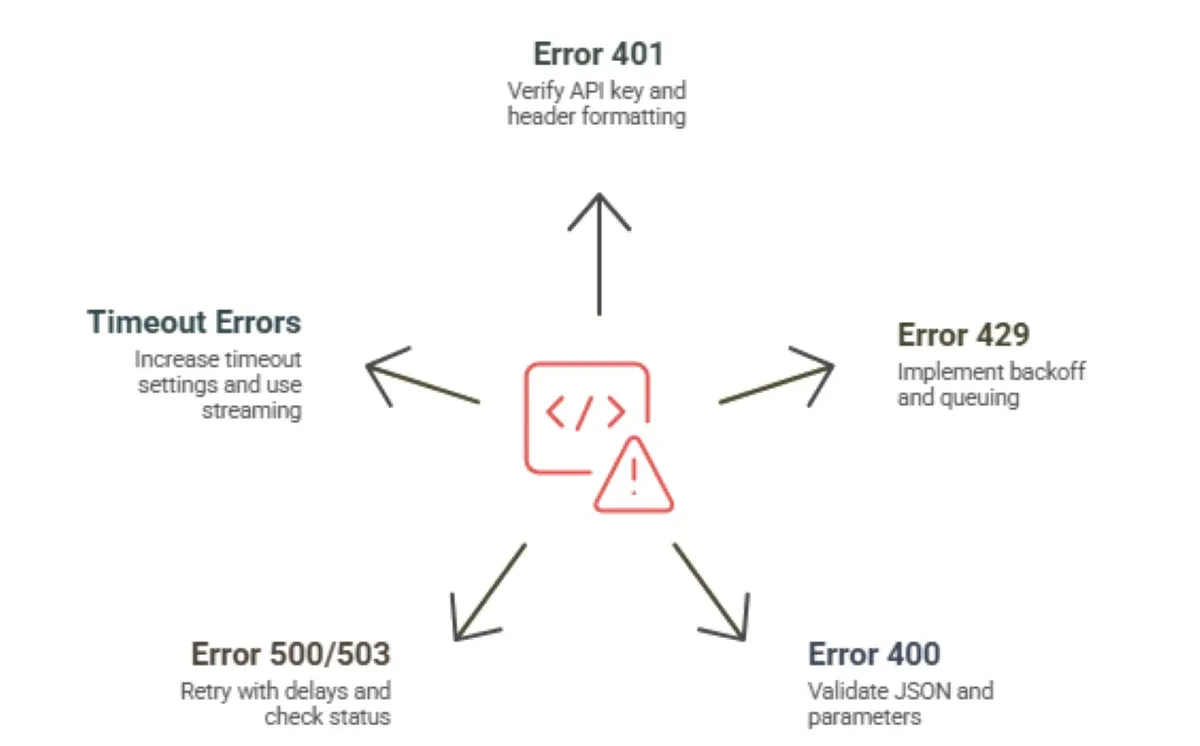
Production deployments encounter errors inevitably. Understanding common failure modes and solutions minimizes downtime and improves user experience.
Cause: Wrong API key, expired key, or missing Authorization header. Solution: Verify key in OpenAI dashboard, regenerate if compromised, check header formatting. Authorization: Bearer YOUR_KEY. Ensure no extra spaces or encoding issues in the key string.
You exceeded the requests per minute or tokens per minute limits. Implement exponential backoff, wait 2^attempt seconds before retrying. Upgrade API tier for higher limits. Implement request queuing to smooth traffic spikes and prevent hitting limits frequently.
Example:

Invalid JSON, wrong parameter types, or missing required fields cause 400 errors. Common mistakes: incorrect message structure (missing role), unsupported parameters, and invalid model names. Validate request JSON before sending using schema validation libraries.
OpenAI's servers occasionally experience issues, not your fault. Implement retry logic with delays (not immediate retries). Check status.openai.com for known incidents. If persistent, contact OpenAI support with request IDs for investigation.
Long responses or network instability cause timeouts. Increase timeout settings in your HTTP client; the default 30 seconds might be insufficient for GPT-5.1. Implement connection retry logic. For long operations, use streaming to maintain connection activity.
Security breaches expose API keys, leading to unauthorized usage and unexpected bills. Implementing proper security from the start prevents costly mistakes.
Hardcoding keys (api_key = "sk-proj-xxx") embeds them in compiled binaries and version control history. Anyone with repository access can extract them. Use environment variables, secret managers, or configuration files excluded from version control repositories.
Store keys in .env files for local development. Use AWS Secrets Manager, Azure Key Vault, or HashiCorp Vault for production. These services provide encryption, access logs, automatic rotation, and fine-grained permissions for enhanced security.
Write concise system prompts; every unnecessary word costs money multiplied by every request. Remove redundant context. Set max_tokens to cap response length, preventing runaway generation. Use temperature 0.2 for factual tasks producing shorter, consistent responses.
Cache common queries and responses in Redis or databases. Before calling the API, check if you've answered this exact question recently. Serve cached responses instantly and for free. Set expiration times based on content staleness, hours for dynamic, and weeks for static.
Don't use GPT-5.1 for simple tasks where GPT-4o-mini suffices. Run A/B tests: serve 10% of traffic with mini, compare quality metrics. Often, quality differences are negligible. Use expensive models only where output quality directly impacts business outcomes.
Set billing alerts in the OpenAI dashboard. Get notified at 50%, 75%, and 90% of the budget. Track costs per feature, per user, or per endpoint. Identify expensive operations and optimize them first. Implement application-level rate limiting to prevent abuse and runaway costs.
Enterprise ChatGPT integrations face unique challenges. Compliance requirements, custom workflows, scale demands, and security needs exceeding standard implementations.
Folio3 AI integrates ChatGPT API seamlessly with existing business systems, including CRMs, ERPs, e-commerce platforms, and custom applications. With 15+ years of AI experience and 1000+ enterprise clients, we ensure zero disruption to your current workflows while adding conversational AI capabilities.
Our ChatGPT integration services serve diverse industries: customer service automation, sales lead qualification, marketing personalization, HR recruitment, e-commerce product recommendations, financial advisory chatbots, travel booking assistance, and educational virtual tutors. Each solution is customized for industry requirements.
Folio3 AI implements secure API authentication, encrypted communication, and custom role-based access control. We ensure compliance with all the industry standards. Choose between cloud or on-premises deployment based on your data governance requirements for complete protection.

You can generate your API key from the OpenAI dashboard under "API Keys." Use environment variables to store it securely and avoid exposing it in your code.
The API works with any language that supports HTTP requests, including Python, Node.js, Java, Go, Swift, Kotlin, and PHP.
Pricing depends on the model (GPT-4.1, GPT-5.1, Mini, etc.). Costs are based on tokens used for input + output. You can optimize cost using system prompts, caching, and shorter responses.
Yes. iOS apps can call the API using Swift, and Android apps can use Kotlin or Java. Ensure secure key handling using backend token exchange systems.
Popular use cases include customer support bots, content generation, coding assistants, document automation, and voice/chat applications.
Yes, OpenAI provides strong data controls and US-friendly compliance support (SOC 2, GDPR, CCPA). Enterprises often use additional hardening provided by partners like Folio3.
Use ChatGPT API if you need fast, low-maintenance integration. Choose a custom model if you want full data control, domain-specific results, or on-prem deployment. Folio3 helps you evaluate both options.