
Loading...
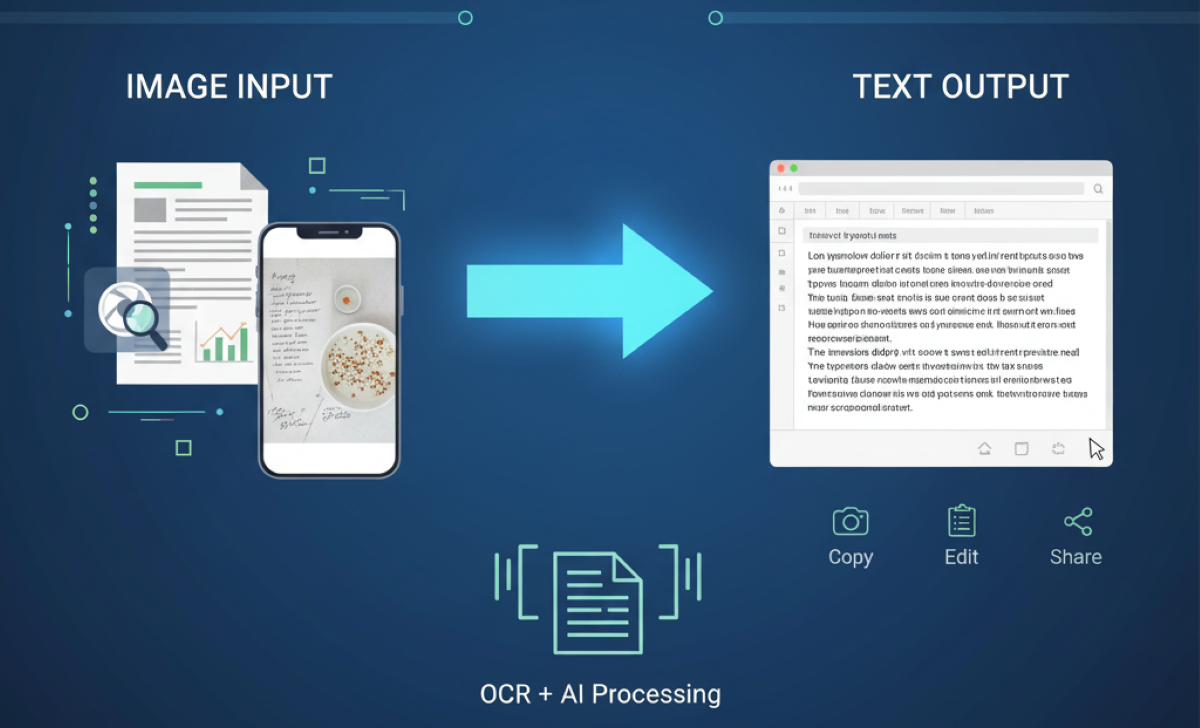
Manual data entry from scanned documents costs businesses time, money, and accuracy. Your team shouldn't waste hours typing information that AI can extract in seconds. Modern image-to-text AI conversion has evolved beyond simple character recognition into intelligent document understanding that handles everything from invoices to handwritten notes.
The global optical character recognition market reached USD 13.95 billion in 2024 and is projected to hit USD 46.09 billion by 2033, growing at a 13.06% CAGR. This growth reflects what businesses discovered: OCR technology now delivers 99%+ accuracy on typed documents, processes handwritten text at 82-90% accuracy, and integrates seamlessly with existing workflows through APIs.
These AI systems understand document context, preserve formatting, extract structured data from tables, and handle complex layouts that used to require manual processing. Companies processing 50+ documents weekly now save thousands of hours annually through automated text extraction.
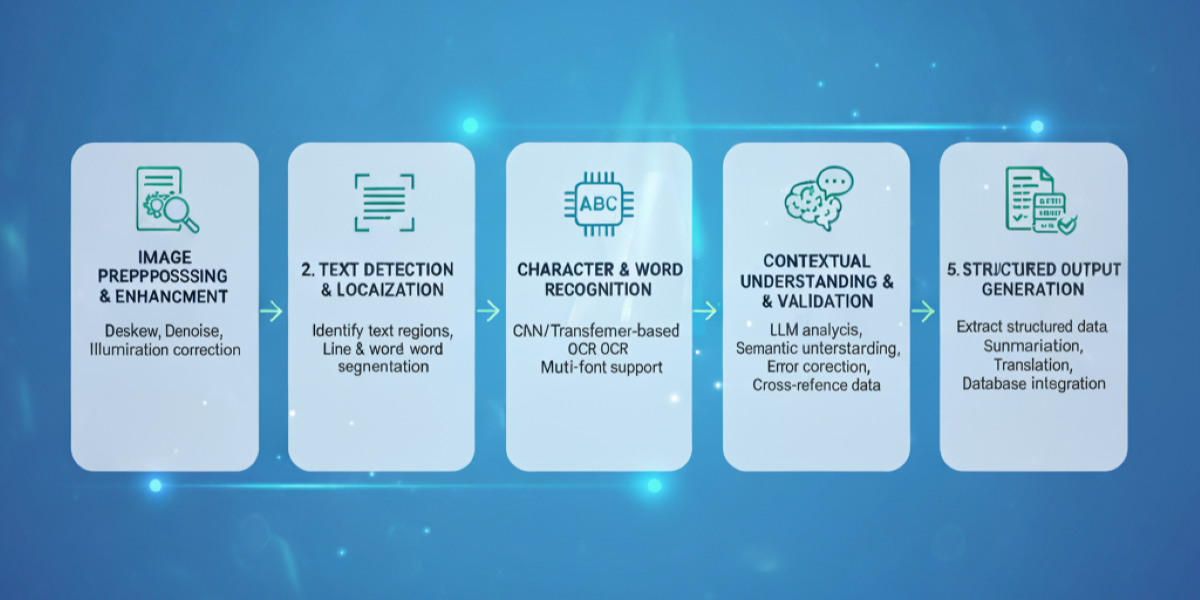
Traditional OCR simply matched character patterns. Modern systems use Vision Language Models that actually comprehend what they read. The difference matters when you're processing business documents that need accuracy and structure preservation.
Before text extraction begins, AI algorithms clean and optimize your images. The system corrects skewed scans, removes background noise, adjusts brightness and contrast, enhances edge detection, and converts to optimal formats. Low-quality phone photos get transformed into clean inputs that maximize recognition accuracy.
AI identifies where text exists within your document. It distinguishes text from images, graphics, and background elements. The system maps text regions, recognizes table structures, identifies form fields and checkboxes, detects headers and footers, and understands multi-column layouts without losing reading order.
Vision Language Models decode characters by understanding context, not just shape matching. They handle various fonts and sizes, process handwritten text including cursive, recognize degraded or faded text, interpret special characters and symbols, and maintain accuracy across 60-198 languages depending on the tool.
Here's where LLMs changed everything. The AI validates extracted text against document context, corrects obvious OCR errors using language understanding, maintains relationships between data fields, preserves document structure and formatting, and extracts key-value pairs from forms automatically.
Your extracted data exports are in usable formats. The system generates searchable PDFs with text layers, creates editable Word/Excel documents, outputs JSON for database integration, preserves tables as structured data, and maintains original document formatting for professional use.
Read more: Mobile ALPR Cameras: capture license plate data
Businesses implement OCR through three approaches depending on volume, technical resources, and integration requirements. Pick the method that matches your operational needs.
Cloud OCR APIs from Google, Microsoft, and Amazon offer enterprise-grade extraction without infrastructure management. You send images via REST API calls, receive JSON responses with extracted text and confidence scores, and integrate directly into existing applications. Benefits include instant scalability, pay-per-use pricing, automatic updates with improved models, and global availability with low latency.
Explore more about Image Classification vs. Object Detection vs. Image Segmentation
Pre-built apps handle OCR without coding. Desktop software like ABBYY FineReader processes batch documents locally. Mobile apps from Adobe and Microsoft let field teams capture documents on-site with immediate text extraction. These solutions work for teams needing point-and-click simplicity, offline processing capabilities, and visual interfaces for document review.
Read more about How to Use Artificial Intelligence in Mobile Apps
Organizations with privacy requirements or high volumes deploy OCR on their infrastructure. Open-source options like Tesseract, PaddleOCR, and Qwen2.5-VL run on your servers with complete data control. You avoid per-page fees on large volumes, customize models for specific documents, and maintain compliance with data residency regulations.
Here is the latest article about Speech-to-Text Devices
Choosing OCR tools requires assessing factors beyond just accuracy percentages. Business requirements vary based on document types, volumes, and workflow integration needs.
Core accuracy should exceed 99% on printed documents and 85%+ on handwriting. Verify the tool handles your specific document types through testing, not marketing claims. Language support matters for international operations as top solutions handle 60-198 languages, including right-to-left scripts and Asian characters.
Speed impacts operational efficiency. Cloud APIs process 1-5 seconds per page with parallel batch handling. Local solutions like Tesseract extract text faster without network latency but require computational resources. For high volumes, evaluate pages-per-minute capabilities and concurrent processing limits.
Modern businesses need OCR embedded in workflows, not standalone tools. Check for RESTful API availability, webhook support for asynchronous processing, SDKs in your programming languages, pre-built connectors to document management systems, and compatibility with RPA platforms for end-to-end automation.
Understand true costs beyond advertised rates. Cloud services charge per page or per API call with volume discounts. Desktop software uses per-seat licensing or annual subscriptions. Open-source is free but requires infrastructure and maintenance costs. Calculate the total cost at your projected volumes, including development and operational overhead.
Document processing involves sensitive information. Verify tools meet required certifications like GDPR, HIPAA, SOC 2, and ISO 27001. Check data retention policies—does the vendor store your documents? For highly regulated industries, self-hosted solutions may be mandatory despite higher operational costs.
Check out our article about the Future of Facial Recognition – Features, Advancements, and Limitations
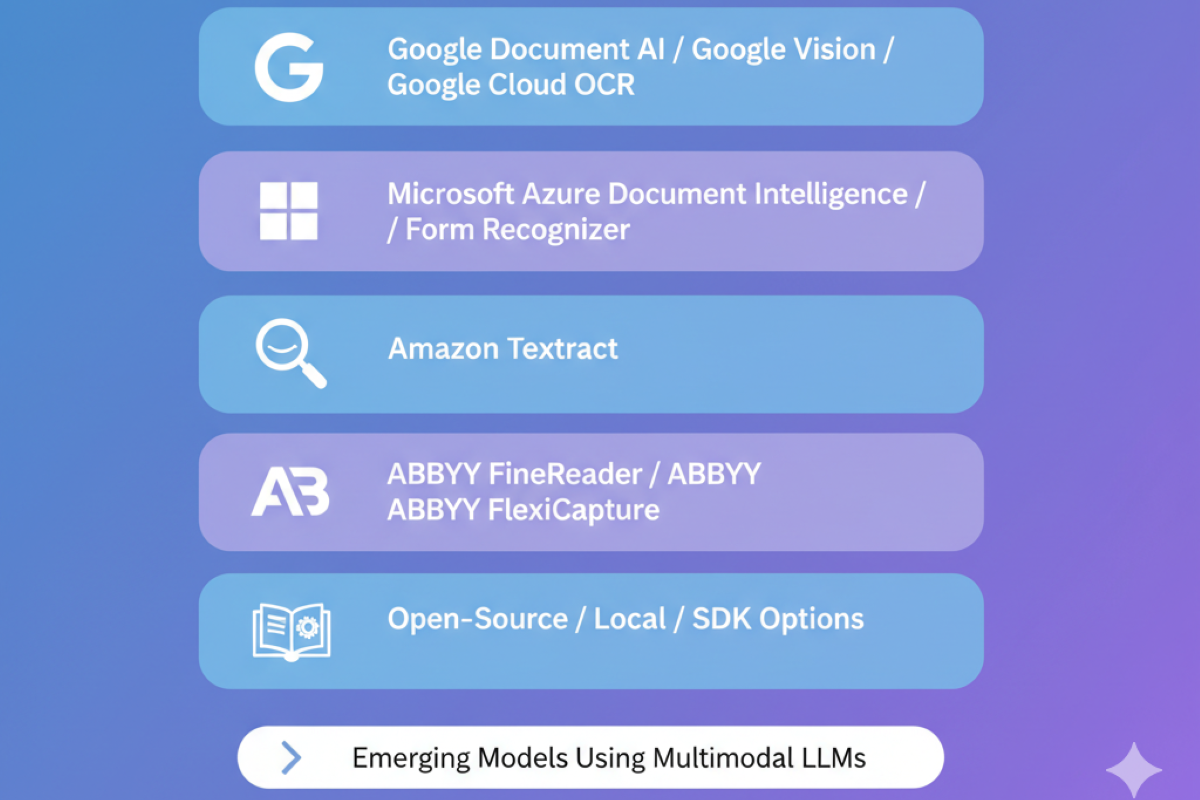
We tested these platforms with real business documents, including invoices with tables, contracts with signatures, scanned forms with handwriting, and technical documents with diagrams. Here's what works.
Google's OCR stack combines Vision AI for general images with Document AI for business documents. The platform handles everything from receipts to complex contracts with strong accuracy and deep integration into the Google Cloud Platform.
98%+ accuracy across diverse document types, with robust handwriting recognition
AutoML Vision lets you train custom models on specialized documents
Seamless integration with Google Cloud Storage, BigQuery, and other GCP services
Requires a Google Cloud Platform commitment for full functionality
Pricing complexity increases with usage across multiple services
Learning curve for Document AI's advanced features
Vision API: ~$1.50 per 1,000 images for text detection
Document AI: Custom pricing based on processors used, starting ~$0.65 per page
Free tier available with 1,000 pages per month
Best for companies already on Google Cloud Platform, businesses processing diverse document types at scale, teams needing custom model training for specialized forms, and organizations requiring integration with Google Workspace.
Not ideal for offline processing or businesses avoiding cloud vendor lock-in.
Bonus Tip: Learn how to detect text by OpenCV and EAST
This online OCR tool is the ultimate platform for image to text AI conversion. With extensive language support, Azure's OCR solution targets enterprises with strong form processing capabilities and deep Office 365 integration. Document Intelligence excels at structured data extraction from business documents.
99.8% accuracy on typed documents with excellent layout preservation
Pre-built models for invoices, receipts, IDs, business cards, and tax forms
Custom model training with 100-200 sample documents for your specific forms
Locked into the Azure platform, migration requires significant effort
Pricing can escalate quickly with high volumes
Custom model training requires technical expertise
Pay-per-page model starting at ~$1 per 1,000 pages
Free tier includes 500 pages monthly
Custom model training incurs additional costs
Ideal for Microsoft-centric organizations, healthcare providers processing patient forms, financial institutions handling invoices and receipts, and businesses requiring form field extraction with key-value pairs.
AWS Textract specializes in forms and tables, with particular strength in financial document processing. The service integrates naturally into AWS workflows and offers strong accuracy on structured documents.
Superior table extraction maintains cell relationships and structure
Form data extraction pulls key-value pairs automatically
The Queries feature lets you ask specific questions about document content
The AWS ecosystem is required for optimal use
Less accurate on handwritten text compared to Google and Azure
Limited language support beyond major languages
Pay per page: ~$1.50 per 1,000 pages for text detection
Forms and tables processing costs extra at ~$50 per 1,000 pages
The queries feature adds $15 per 1,000 pages
Perfect for AWS-based companies, financial institutions processing invoices and statements, businesses heavily using forms and tables, and organizations needing document querying capabilities.
Not recommended for handwriting-heavy documents or non-AWS environments.
Bonus read: How to Integrate Google Speech-to-Text API into Your Applications
ABBYY brings 29 years of OCR expertise with exceptional accuracy and the industry's best language support. FlexiCapture adds enterprise document capture and workflow automation for high-volume operations.
99.8% accuracy on printed text with best-in-class recognition quality
198 language support, including complex scripts—unmatched in the industry
Desktop software processes documents offline with complete data privacy
Higher upfront costs compared to pay-as-you-go cloud services
Interface feels dated compared to modern cloud platforms
Less integration with modern cloud ecosystems
FineReader Standard: ~$120 one-time purchase per license
FineReader Corporate: ~$200 per license with volume discounts
FlexiCapture: Custom enterprise pricing based on volume
Best for multilingual global operations, businesses with strict data privacy requirements preventing cloud use, companies processing 1,000+ pages monthly where per-page fees add up, and organizations needing offline processing.
Overkill for occasional use or small teams.
Open-source OCR gives you complete control without usage fees. Modern options like Qwen2.5-VL approach commercial accuracy while maintaining privacy and flexibility.
Google-maintained classic with decent accuracy on clean documents. Supports 100+ languages. Requires preprocessing for optimal results. Good baseline but lags modern VLMs.
Excellent for Chinese and multilingual content. Fast processing with multiple model sizes. Actively maintained with frequent updates. Strong Asian language support.
80+ language support with a simple Python API. Good balance of accuracy and speed. Lightweight models run on modest hardware. Popular with developers.
Modern VLM with 90+ languages and near-commercial accuracy. Multiple model sizes (2B to 72B parameters). Handles complex layouts and tables. Requires more computational resources.
Zero per-page costs after infrastructure investment
Complete data privacy, documents never leave your servers
Full customization and model fine-tuning capabilities
Requires technical expertise for deployment and maintenance
No vendor support—you're responsible for troubleshooting
Infrastructure costs for servers and GPU resources
Software: Free (Apache 2.0, GPL, or similar licenses)
Infrastructure: $50-500+ monthly, depending on volume and hardware
Development: Engineering time for integration and maintenance
Ideal for companies with in-house development teams, organizations with strict data residency requirements, businesses processing 10,000+ pages monthly where usage fees become prohibitive, and teams needing customized models for specialized documents.
Not suitable for non-technical teams or businesses needing vendor support.
Latest VLMs like GPT-4.5 Preview, Claude 3.7 Sonnet, Gemini 2.5 Pro, and Mistral OCR represent the cutting edge. These models understand documents like humans do, reading context, maintaining structure, and enabling queries about extracted content.
Launched in early 2025, processes up to 2,000 pages per minute. Extracts text, tables, images, and equations as structured JSON. Built for RAG integration. $1 per 1,000 pages.
Tops accuracy benchmarks across document types. Handles complex layouts and handwriting at 82-90% accuracy. Available via OpenAI API. Higher costs but exceptional quality.
Strong cursive handwriting recognition and document understanding. Fast processing with good accuracy. Anthropic API access required.
Long context window handles large documents. Strong multilingual support. Google Cloud integration. Slower but handles reasoning about document content.
Highest accuracy on complex documents, including handwriting
Understands document meaning, not just character recognition
Enables document querying and question-answering post-extraction
Highest per-page costs among all options
Requires API integration—no standalone applications
Rate limits can impact high-volume operations
Mistral OCR: $1 per 1,000 pages (best value in this category)
GPT-4 Vision: ~$10-30 per 1,000 pages, depending on model
Claude: Similar to GPT-4 pricing with token-based billing
Gemini: Variable based on model size and Google Cloud agreement
Perfect for businesses needing document intelligence beyond extraction, companies processing complex technical documents with equations and diagrams, teams building AI applications requiring document understanding, and organizations where accuracy justifies premium pricing.
Not cost-effective for simple documents or high-volume basic extraction.
Check out our Machine Learning development services
Implementing OCR successfully requires more than choosing the right tool. Follow these practices to maximize accuracy and efficiency.
Never trust OCR 100% on business-critical data. Implement human review for financial amounts, dates, names, addresses, and contract terms. Use confidence scores to flag low-quality extractions. Build validation rules checking extracted data against expected formats and ranges. Calculate error rate by document type to focus review efforts where needed.
Image quality determines extraction accuracy. Auto-rotate scanned pages to correct orientation. Crop out extraneous borders and margins. Adjust contrast and brightness for faded documents. Remove background noise and artifacts. Deskew angled scans. Convert to grayscale unless color matters. Good preprocessing can improve accuracy by 10-20% on poor-quality originals.
Generic OCR works for standard documents. Custom-trained models dramatically improve accuracy on specialized forms. Azure and Google offer custom model training with 100-200 sample documents. Open-source solutions let you fine-tune models on your specific document types. Investment in custom models pays off when processing thousands of similar documents monthly.
Continuously improve accuracy through systematic quality assurance. Track error types and rates by document category. Feed corrections back into model training. Implement confidence thresholds triggering human review. Use A/B testing when evaluating new models or preprocessing techniques. Build metrics dashboards showing accuracy trends over time.
Combine traditional OCR with LLM-based post-processing for the best results. Extract text with fast OCR engines. Pass results through language models for error correction using context. Apply business logic validations. Use AI to structure unstructured extracted data. This hybrid approach balances speed with accuracy at reasonable costs.
Manual document processing doesn't scale. Build automated pipelines: documents upload to cloud storage, trigger OCR processing automatically, results flow into databases or business systems, exceptions route to human review queues, and confirmations notify stakeholders. Use workflow orchestration tools like Apache Airflow or Azure Logic Apps. Monitor with alerts for failures or accuracy drops.
The best choice depends on your needs; choose tools supporting multiple formats (JPG, PNG, TIFF), AI-enhanced OCR, bulk processing, and privacy protection.
AI tools like Google Vision AI, Tesseract OCR, and Amazon Textract lead due to speed, language support, and 95%+ accuracy. Custom AI OCR also excels for enterprise needs.
Modern AI-powered OCR tools reach 95–98% accuracy, even with low-resolution images or poor lighting, especially when paired with machine learning post-correction.
They use computer vision and deep learning models to detect text regions, segment characters, and extract them into editable formats like Word or TXT.
Yes, advanced AI OCR tools support printed documents, screenshots, and clear handwritten notes. Handwriting recognition is improving rapidly.
ABBYY FineReader and Google Vision AI are highly accurate for scanned PDFs, offering advanced layout retention and bulk digitization support.
Both exist: Online tools are faster to access, while offline OCR (Adobe Acrobat Pro, ABBYY) ensures privacy and enterprise-grade features.
Yes, many AI OCR tools support 60+ languages, including complex scripts like Arabic or Mandarin. Always confirm language compatibility before use.
Yes. MyScript and Google Vision AI can handle cursive or inconsistent handwriting with moderate accuracy if high-quality scans are used.
AI tools can extract text in seconds, up to 50x faster than manual typing, making them ideal for digitizing bulk archives or forms.