
Loading...
Dealing with important papers has become a routine of business. The market has also become tough and competitive. Every organization needs to evaluate massive bundles of data to reach its target audience. In this context, understanding the difference between OCR vs. IDP becomes crucial for optimizing data processing and improving efficiency.
As a result, handling papers properly is more important than ever. OCR and IDP are helpful tools in this case.
Due to their unique feature sets, OCR and IDP are both beneficial resources for companies. But, they have different purposes, so it's critical to comprehend how they differ to choose the solution that best meets your requirements.
By the end of this blog, you will clearly understand which technology fits right, and the difference between OCR vs. IDP empowering you to make an informed decision about your document management strategy.
Certainly, here's a more comprehensive table comparing OCR vs IDP with detailed information under each heading.
Makes documents searchable and editable.
Relatively affordable and simple to install
Basic text capture is made simple and efficient.
Advanced document automation.
Accurate with structured documents.
Improved error handling and layout understanding.
Limited functionality
Struggles with complex formats
Accuracy can be affected
Needs training data.
Can be computationally costly.
Not for highly specialized docs.
Typical Applications
Digitizing archives.
Editing scanned docs.
Enhancing accessibility.
Automating workflows.
Extracting data for analysis.
Streamlining document tasks.
Converting scans to editable text.
Making historical docs searchable.
Extracting text from images or notes.
Automating customer onboarding data entry.
Extracting key info from insurance claims.
Sorting invoices for faster processing.
OCR stands for optical character recognition. It is a technology that scans documents. It primarily deals with information captured visually from scanned documents, invoices, or images.
Therefore, you don't need to worry if you have a scanned PDF of a contract or a picture of a receipt. It can quickly turn an image into a text format that you can edit, search, and change electronically. This minimizes the need for costly, error-prone manual data entry.
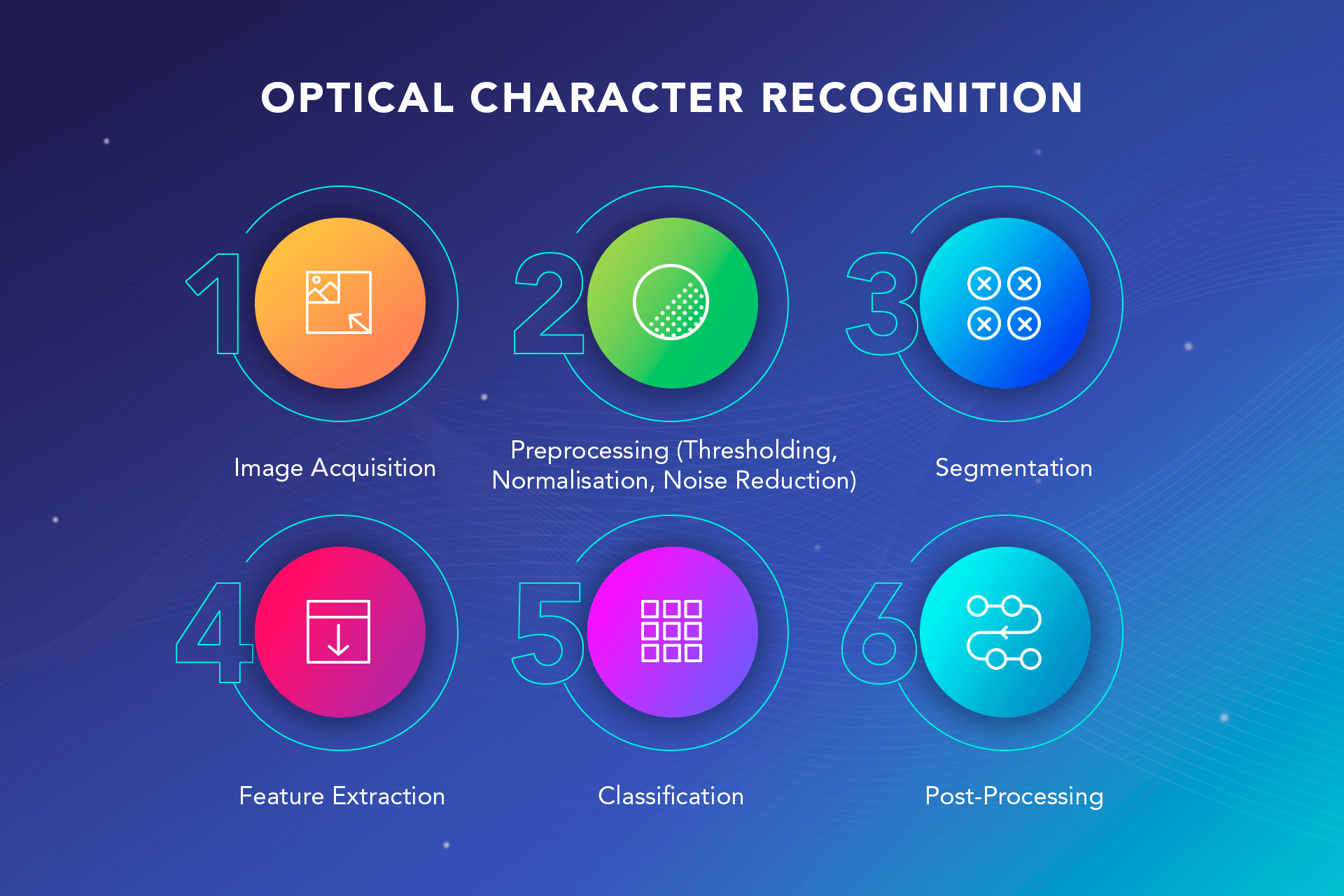
OCR is a remarkable technology that converts text from static images to editable digital text. It adheres to a few procedures.
Pattern Matching: The software compares the shapes and features of characters in the image to a database of known characters. It essentially tries to find the best match between the image and its stored templates of letters, numbers, and symbols.
Feature Extraction: This approach analyzes the individual components of a character, like lines, curves, and endpoints. The OCR engine can reconstruct and recognize the character by identifying these features.
Post-Processing: In the last step, before giving a final output of the text, it will carry out some post-processing techniques after character resignation in an image or document. This will help guarantee that the information provided is accurate and grammatically correct and that no errors are made in the detected text.
OCR technology opens endless possibilities for businesses and individuals alike. Here are five key areas where this technology shines
Digitizing Paperwork: OCR is an innovator for businesses with a heavy paper load. It allows for the scanning of, contracts, receipts, small business invoice templates and other documents to be converted into searchable digital files that can be edited. This eliminates the need for physical storage of documents and creates a more paperless working environment.
Accessibility for All: By transforming scanned documents or text images into digital formats that text-to-speech software can read aloud, optical character recognition (OCR) facilitates people with visual or reading impairments. This shuts down the access gap and guarantees that this information is available to all.
Simplifying Data Entry: Entering data is time-consuming and prone to mistakes. OCR automates this process by removing text from business cards, forms, and other documents with fillable fields. This saves a lot of time, decreases human error, and refines data collection.
Boosting Research and Archiving: OCR breathes new life into historical documents, archived newspapers, or handwritten manuscripts. It easily converts them into digital text, which allows researchers to search and analyze vast amounts of information. It's the best when accelerating the pace of discovery and historic preservation.
Supercharging Mobile Apps: OCR is making its way into mobile apps, allowing users to scan documents. Imagine capturing a receipt with your phone's camera and instantly having the digital text for expense reports or warranty claims. It empowers mobile applications with powerful document processing capabilities.
IDP stands for Intelligent Document Processing. It's the next level up from OCR, adding a layer of intelligence to further automate document processing. It can extract text from documents just like OCR, but it goes beyond that.
IDP recognizes characters, but it also understands a document's overall structure and layout. This allows it to identify different sections, such as invoices, addresses, or product details on a form. It extracts text and data hidden within documents. For example, it can pull out dates, currency values, or even specific keywords based on pre-defined rules.
So, while OCR focuses on converting images to text, IDP takes that a step further by transforming documents into structured data that is easily integrated with other business systems or applications.
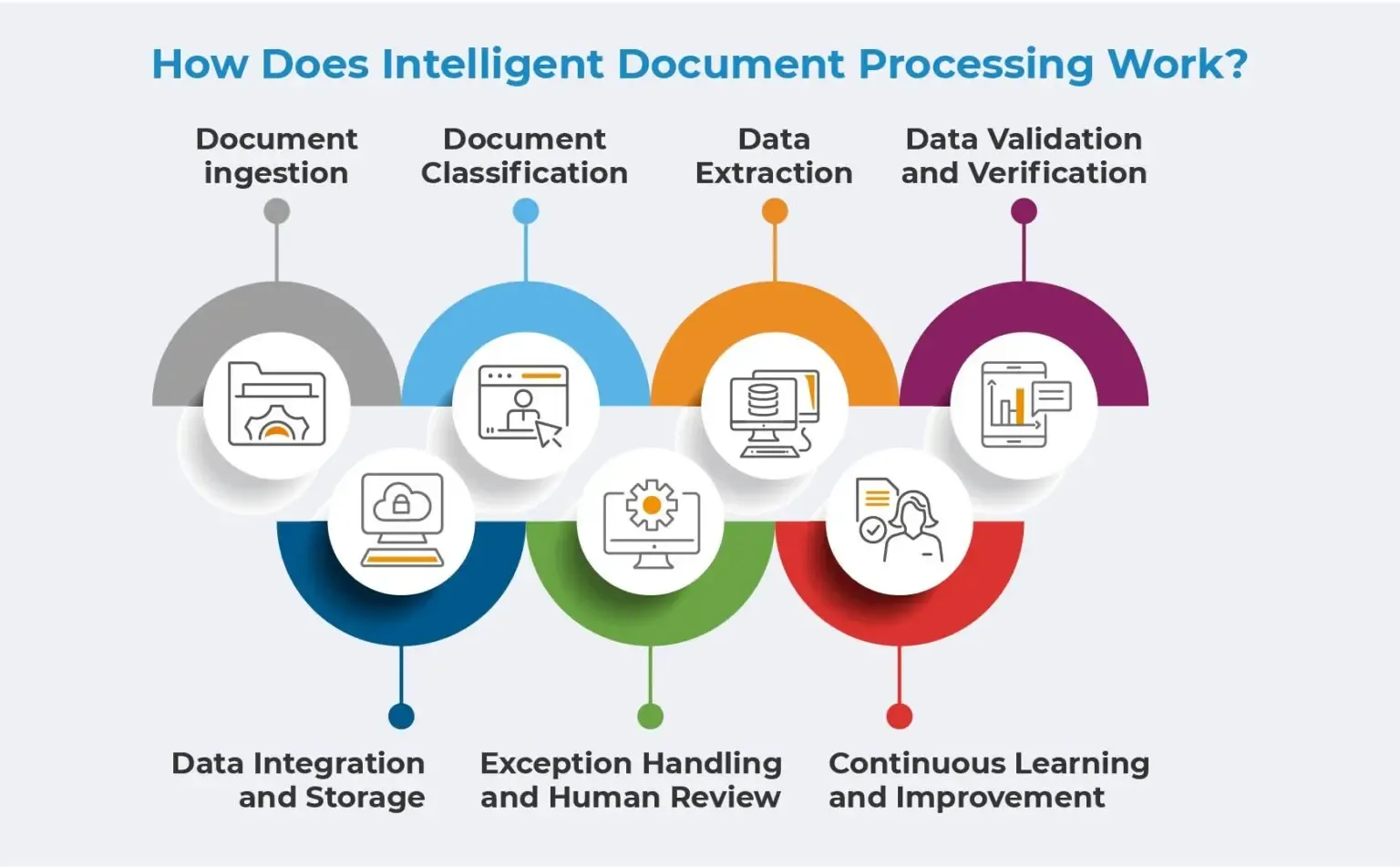
In Intelligent Document Processing (IDP), OCR technology is expanded to produce a more advanced document processing system. Here's a breakdown of how it works.
Document Ingestion: Similar to OCR, IDP starts by ingesting the document, which can be a scanned image, a PDF file, or even an email attachment.
Advanced Preprocessing: While OCR focuses on basic image cleaning, IDP goes deeper. It might analyze the document layout, identify different document types (invoices, receipts, etc.), and even perform techniques like form extraction to separate specific sections.
Intelligent OCR and Character Recognition: IDP integrates OCR to extract text from the document. However, it goes beyond simple character recognition. It handles complex layouts, handwritten text (with higher accuracy than OCR alone), and potentially even different languages.
Data Classification and Extraction: This is where IDP truly shines. Using a combination of techniques like machine learning and pre-defined rules, It analyzes the extracted text and classifies it into meaningful categories. It also helps identify specific data points like names, addresses, invoice numbers, or any other relevant information based on the document type.
Data Validation and Correction: IDP doesn't just blindly extract data. It often employs data validation techniques to check for inconsistencies or errors. It might cross-reference extracted information or use fuzzy logic to identify potential mistakes. This helps ensure the accuracy of the extracted data.
Data Export and Integration: The final step involves exporting the extracted, structured data into a usable format. This could be a CSV file, integration with enterprise resource planning (ERP) systems, or feeding the data into workflow applications. IDP essentially transforms documents into valuable, machine-readable information.
Intelligent Document Processing (IDP) transcends the limitations of OCR, offering a powerful suite of functionalities for businesses. Here are five compelling applications that showcase the transformative potential of IDP.
Automating Accounts Payable (AP): Imagine automatically processing invoices. IDP can extract key information like vendor name, invoice number, line items, and total amount. This eliminates manual data entry, accelerates invoice processing, and reduces the risk of errors.
Streamlining Customer Onboarding: New customer applications often involve mountains of paperwork. IDP can extract data from ID cards, passports, or utility bills, populating customer information systems and expediting onboarding.
Enhancing Loan Processing: IDP can automate loan applications by extracting relevant data from financial documents like tax returns, pay stubs, and bank statements. This speeds up loan processing times and improves the overall customer experience.
Supercharging Insurance Claims: Processing insurance claims can be a tedious task. IDP can extract details from accident reports, medical records, and receipts, streamlining the claims process and ensuring faster payouts.
Boosting Data Analytics: IDP unlocks valuable data trapped within documents. IDP feeds data analytics tools by extracting structured information, enabling businesses to gain deeper insights, identify trends, and make data-driven decisions.
The efficient management of documents is a key issue in today's data-driven world. While drowning in a sea of paper might seem like a relic of the past, many businesses still grapple with paper-based documents and manual data entry.
This is where Optical Character Recognition (OCR) and Intelligent Document Processing (IDP) step in, offering a powerful one-two punch to streamline workflows and unlock valuable data.
Retail Inventory Management: Retailers are using OCR to digitize product labels and lists of goods. This allows them to update inventory levels rapidly, monitor product movements, and manage the replenishment process automatically.
Healthcare Records Digitization: Healthcare facilities use OCR to convert handwritten patient records, prescription notes, and medical reports into electronic formats. This facilitates faster patient information access, improves diagnosis accuracy, and enhances medical care.
Accounts Payable Automation: Businesses use OCR to extract vendor invoice data, thereby simplifying the accounts payable process. This information is then entered into the accounting software system to simplify invoice processing, reduce errors, and speed up payment cycles.
Insurance Claims Processing: Insurance companies use IDP to quickly process claims forms and documents. It extracts important information like policyholder details and claim amounts. This helps speed up the claims process and makes customers happier.
Financial Document Analysis: To manage financial documents including loan applications, bank statements, and tax reports, banks and other financial organizations rely on IDP. It expedites loan approvals and improves the accuracy of financial assessments by automating processes including data extraction, information verification, and risk assessment.
Legal Document Review: Law firms and legal departments use IDP to simplify the review of legal contracts, agreements, and court documents. IDP automatically spots important clauses, deadlines, and obligations in documents. This helps legal professionals analyze and manage case-related information effectively.
Managing documents is a daily struggle for businesses, but it doesn't mean integrating any technology. The complexity of documents needs to be assessed by businesses, and they need to understand which approach, OCR (Optical Character Recognition) or IDP (Intelligent Document Processing) is best suited for them.
For simple text extraction tasks such as scanning printed materials or creating searchable documents, OCR is ideal. It is primarily focused on the recognition of characters and converting images or scanned documents to text, which can be edited.
By using OCR with advanced technologies such as machine learning and AI, IDP automates the process of processing documents. This includes more complex tasks, such as data extraction, document classification, validation, and business process automation, compared with the extraction of text.
Ultimately, to select the solution best suited to their objectives and needs, companies should evaluate how many documents they are dealing with as well as what type of document processing is required.
However, choosing from these forefront technologies, OCR vs IDP, for your business workflow depends on the specific needs of your documents and processes. Here's a breakdown to help you decide.
You need a simple, cost-effective solution for converting scanned documents (invoices, receipts, contracts) into editable text.
Your documents have clear layouts with basic fonts and minimal formatting variations.
You don't require advanced data extraction or context understanding.
You deal with many documents in various formats (structured, semi-structured, unstructured).
Your documents have complex layouts and handwritten text or require table extraction.
You need to automate document processing workflows and extract specific data points.
You want to gain insights from documents by analyzing extracted data.
Choosing the right OCR solution comes down to understanding your business goals and testing the technology in real-world scenarios. Evaluate which option simplifies your document workflows, improves accuracy, and saves time. In many cases, OCR and IDP can work together, combining automation with intelligent data extraction, to deliver a complete, future-ready solution.
OCR (Optical Character Recognition) extracts text from images or scanned documents, while IDP (Intelligent Document Processing) uses AI, NLP, and ML to understand, classify, and process entire documents, not just text.
Yes. IDP is a more advanced solution because it goes beyond text extraction; it can read structured and unstructured documents, extract contextual data, and automate workflows with minimal human input.
IDP uses OCR as its first step to capture data, then applies artificial intelligence models like machine learning, computer vision, and natural language processing to interpret and organize that data automatically.
IDP is significantly more accurate because it learns from data patterns and continuously improves through AI training. OCR accuracy is limited to image quality and cannot adapt or understand document context.
A business should move from OCR to IDP when handling high document volumes, complex layouts, or data-heavy processes where manual review slows productivity or increases errors.
Yes. OCR can be used within IDP systems as the initial text-extraction layer, while IDP handles advanced tasks such as data validation, document classification, and integration into business systems.
Industries like banking, insurance, logistics, healthcare, and manufacturing gain the most, especially where invoice processing, claims management, or identity verification require high automation accuracy.
AI transforms OCR into IDP by adding contextual understanding, language processing, and data learning capabilities. This allows systems to extract meaning and insights, not just characters.
OCR is ideal for simple tasks like digitizing receipts or printed forms, while IDP handles complex workflows such as invoice automation, customer onboarding, or document compliance analysis.
If you need basic text extraction, OCR may suffice. But if your goal is automation, accuracy, and integration with enterprise systems, IDP is the smarter, scalable choice.